How does the Jimani AI credit screen work?
- Answer
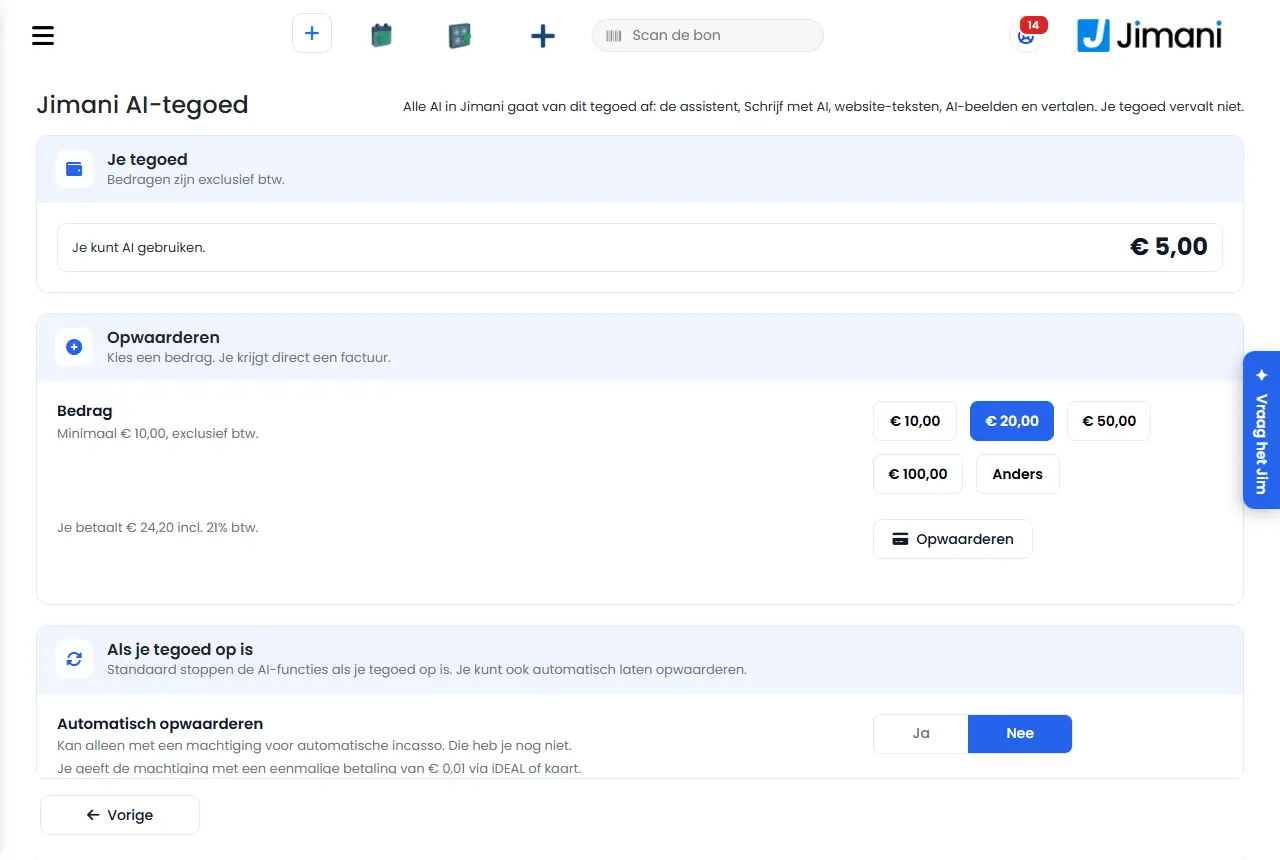
In Jimani AI credit you see your balance, top up, choose what happens when the credit runs out, and see your usage and your invoices. "All AI in Jimani is paid from this credit: the assistant, Write with AI, website texts, AI images and translating. Your credit does not expire."
- Where to find it
Settings > Money and figures > Jimani AI credit, under Administration and costs (
/Aitegoed)- Explanation
All amounts on the screen exclude VAT. What AI costs and how much welcome credit you get is explained in What does using AI in Jimani cost?. The user permission is called Jimani AI credit. At the bottom, Previous goes back to Settings.
- Buttons and settings
Name What it does When you use it Note Your credit Your balance, with "You can use AI.", "Your credit is running low." or "Your credit has run out. The AI features are paused until you top up." To see how much you have left. - Amount Buttons for €10, €20, €50 and €100, or Other for a Custom amount. When topping up. At least €10 and at most €1,000, excluding VAT. Below it you see what you pay including 21% VAT. Top up Starts the payment via Mollie. "Choose an amount. You get an invoice right away." When your credit has (almost) run out. Your credit grows by the amount excluding VAT. Pay by direct debit Tops up and debits the amount via your direct debit mandate. If you already have a mandate and do not want to pay via Mollie. Only visible with a mandate. Automatic top-up Yes or No. Yes: Jimani tops up by itself when the credit drops below your threshold. No: the AI features stop when your credit runs out. If AI must always keep working. Only possible with a direct debit mandate; without a mandate, Yes is switched off. Your choice is saved immediately. Set up direct debit Gives a mandate with a one-off payment of €0.01 via iDEAL or card. If you want to top up automatically but do not have a mandate yet. "Only possible with a direct debit mandate. You do not have one yet." Amount to add The amount of each automatic top-up. With Automatic top-up Yes. At least €10, excluding VAT. Top up when the balance drops below The threshold for automatic top-up. With Automatic top-up Yes. Each time you get an email and an invoice. Usage The last 30 days per feature, and per Day, Feature, Times and Amount. To see where your credit goes. - Top-ups and invoices Each top-up with Date, Balance, Paid incl. VAT, Status (Paid, Waiting for payment, Failed; automatic if that is the case) and the Invoice as a pdf. For your administration. Also available under Invoicing and costs. - Messages
Message What it means What you do Your Jimani AI credit has run out. Top up to use AI again. You clicked an AI button, but your credit has run out. Top up, or set Automatic top-up to Yes. Choose an amount of at least {0} and at most {1}. The custom amount is too low or too high. Choose an amount between €10 and €1,000. Saved Your choice for automatic top-up has been saved. - Saving failed. Please try again. Saving did not work. Try again. Setting up direct debit is not possible right now. Please try again later. The mandate could not be started. Try again later. - Related
What does using AI in Jimani cost?, How does Invoicing and costs work?
- How do I top up my AI credit?
- Does my AI credit expire?
- What happens when my AI credit runs out?
- What does Jimani use my AI credit for?
- Where do I see my AI usage and invoices?
Keywords: ai credit top up, automatic top-up, credit used up, ai usage, jim credit, direct debit mandate
Last checked: 2026-10-16
Translated from the Dutch knowledge base; the Dutch version is leading.