How does Day closing work in Jimani?
- Answer
Under Day closing you see all closings of your POS, make a closing yourself, set up the automatic closing and the email, and as the owner fetch the POS audit file and the cash register journal. A closing always starts where the previous one ended.
- Where to find it
Settings > Money and figures > Day closing (
/Settings/DayClose).- Explanation
The list shows per closing Date, Date to, Point of sale, Type, Users, Revenue and Total VAT, with the Total at the bottom. At the top right are the buttons for the cash register journal, the audit file, the settings, printing the list and making a new closing. On the POS itself (POS view) you only see Print.
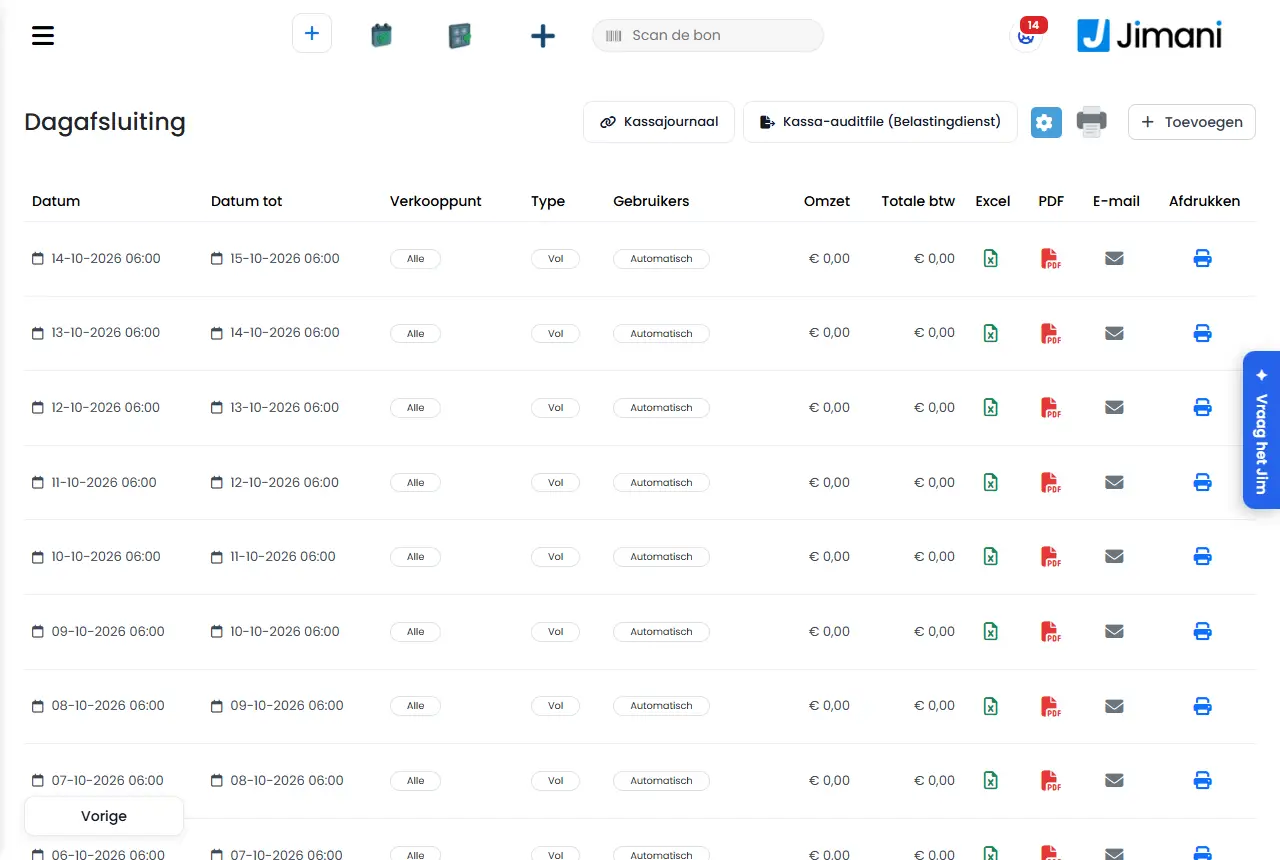
- Buttons and settings
Name What it does When to use it Note Plus at the top right Opens the Day closing window to close yourself. If you want to close the day yourself. See below. Cog (End-of-day settings) Opens the window with the automatic closing, the email and the fixed change. To choose the closing time and the email. See How do I have the day closing made and emailed automatically?. Printer icon (Print) Prints the list as it appears on the screen. For an overview on paper or pdf. Not in the POS view. See How do I print a list or overview?. Cash register journal Shows the hash chain of the cash register journal. To check whether anything has changed. Owner only. POS audit file (Dutch Tax Authority) Download of the file for the Belastingdienst. During an inspection. Owner only and not in the POS view. Excel, PDF, Email, Print (columns) Per line the closing as Excel, as pdf, by email or on the receipt printer. To share or keep a closing. Excel, PDF and Email only on the computer; Print only if there is a receipt printer or POS. No data found The list is empty. - Nothing has been closed yet. - Day closing window (new closing)
Name What it does When to use it Note Day close of the full day On: you close the whole day and only see Date from. Off: Date to, Time from and Time to are added. Usually leave on. A closing always starts where the previous one ended and ends at the latest now. Date from The day on which the closing starts. For the first closing of a business. After that Jimani determines the start itself. With minus and plus you go a day back or forward. Date to The last day. Only if the full day is off. Cannot be in the future. Time from The start time. Only if the full day is off. In steps of 15 minutes. Time to The end time. Only if the full day is off. In steps of 15 minutes. Point of sale For which point of sale the closing is: Select all or a POS. If you have more POS devices. The closing receipt itself counts over the whole business. Type Full, Financial or Reservation. To record the kind of closing. Appears in the list under Type. Users All users or an employee. To record who closed or for whom. Appears in the list under Users. Save Makes the closing. After choosing. If cash counting is on, Count the cash opens immediately. - End-of-day settings window
Name What it does When to use it Note Automatic day closing Closes the day automatically every night. The night round closes the day every day at this time, on the shop's clock. Leave on by default. Default Yes. End-of-day closing time When the day is closed. Choose a time after closing. To choose the time. Default 06:00. As hh:mm; with minus and plus one minute back or forward. Fixed change in the drawer Every day each cash drawer starts with this amount. After counting at the day closing, Jimani says what you take out; the rest stays for tomorrow. If you leave the same change in the drawer every day. Yes or No, saves immediately. Change per drawer For example 150. This stays in the drawer after skimming off. With Fixed change on Yes. With Yes an amount is required. Email the end-of-day closing automatically After every day closing the financial overview (pdf, with the Excel attached) goes to the addresses. For the bookkeeper or the owner. For the automatic and for a manual closing. Email addresses Separate multiple addresses with a comma. With emailing on Yes. At least one valid address. - Email window
Name What it does When to use it Note Email The address you send the closing to (Enter the email address here). To forward a closing. The subject is Day closing with the shop and the period. Download Download PDF: the pdf of the closing. To keep it. - - POS audit file window (Dutch Tax Authority)
Name What it does When to use it Note From The first day in the file. During an inspection. Default 1 January of the previous year. With minus and plus a day back or forward. Up to and including The last day in the file. During an inspection. Default 31 December of the previous year. The end date is included. At most one year. Download Fetches the file. After choosing the period. Without a VAT number you get a warning. - Cash register journal window
Name What it does When to use it Note Chain status Chain intact, or Break at receipt or Break at link. To check whether anything has changed. Checked every night. Check now Checks immediately, from the beginning. Before a visit from the Belastingdienst. The result then appears in the window. Numbering per register The sequence number of the receipts per POS, with Gaps or No gaps. To see whether a receipt is missing. - - Messages
Message What it means What to do Enter a time as hh:mm. The End-of-day closing time is not valid. Enter for example 04:00. Enter at least one email address. Emailing is on without an address. Enter an address or turn emailing off. This is not a valid email address: {0} An address has an error. Correct the address. Enter a valid amount. The change is not an amount or is too large. Enter an amount up to 100,000. Enter the change that stays in the drawer. Fixed change is on without an amount. Enter an amount. The email has been sent. The closing has been emailed. - The email could not be sent. Emailing failed. Try again. Choose a valid period. The dates in the audit file are not valid. Choose dates. The end date is before the start date. The period runs backwards. Swap the dates. Export failed The audit file could not be created. Try again. The hash chain is not yet turned on for this environment. The cash register journal has no chain yet. Wait for the rollout. - Related
How does the day closing and counting the cash work?, How do I make a day closing myself and how do I download, email or print it?, How do I download the POS audit file and check the cash register journal?, How does Count the cash work in Jimani?
- Where do I find all day closings of my POS?
- Where do I fetch the POS audit file as the owner?
- From which moment does a new day closing start?
- Where do I set up the automatic day closing?
Keywords: day closing, z report, set up day closing, audit file, cash register journal, fixed change, email day closing
Last checked: 2026-10-16
Translated from the Dutch knowledge base; the Dutch version is leading.