How does the Newsletters screen work in Jimani?
- Answer
On the Newsletters screen you see all your drafts, scheduled and sent newsletters with the results per newsletter, and at the bottom you set who you may email, under which name and in which color. The screen only exists if the add-on Newsletters is turned on.
- Where to find it
Settings > Communication > Email, tab Newsletters (
/Nieuwsbrieven)- Explanation
At the top right is + Newsletter to create a new newsletter; see How does the Newsletter window work in Jimani?. The block Your newsletters shows two counters: "sent this month" (for example 120 / 500: the free limit of 500 emails per month; if it is more, it says below that this month costs €5) and the number of guests with the checkbox "I want to receive news". Below that is the list. The Settings block at the bottom determines who you may email. Free up to 500 emails per month, above that €5 per month, the screen says (see How do I send a newsletter to my guests, and what does it cost?).
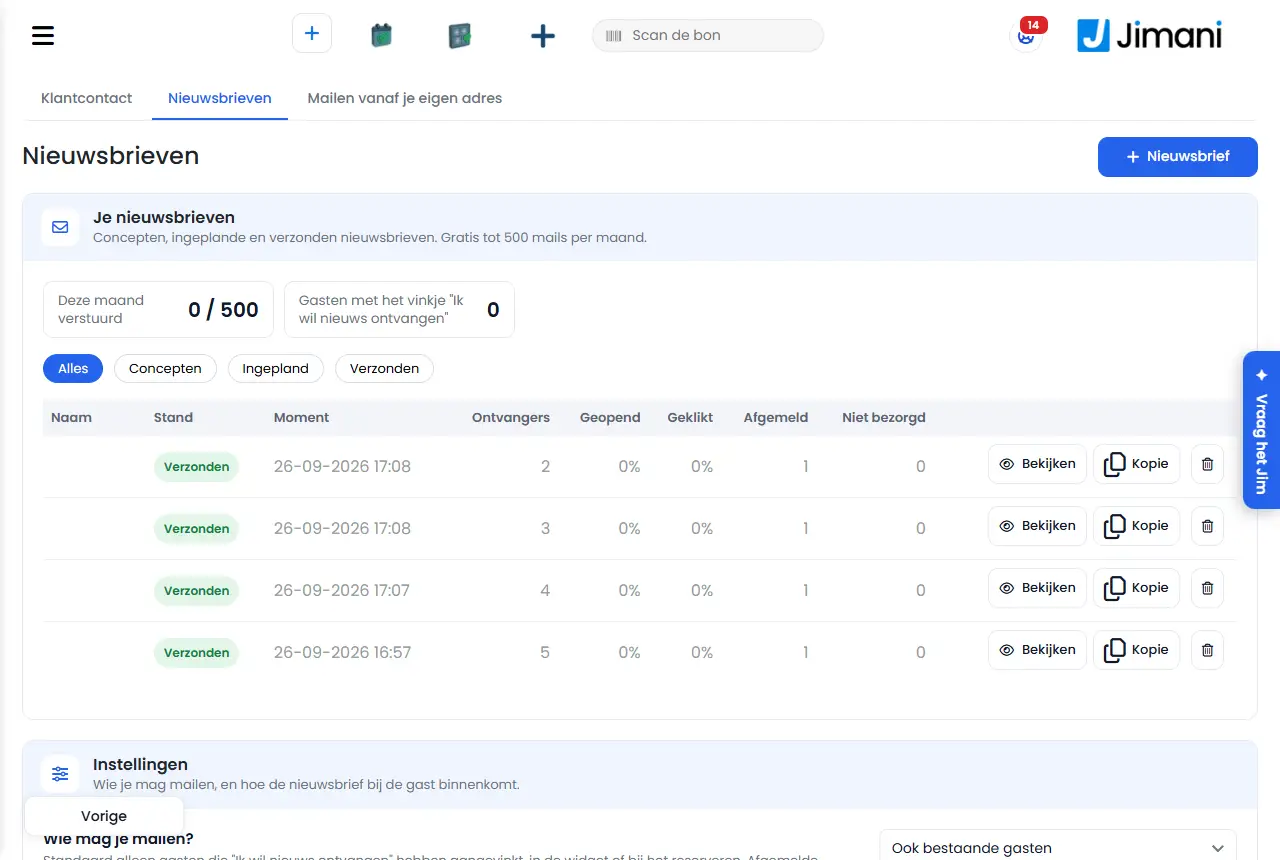
- Buttons and settings
Name What it does When you use it Note + Newsletter Opens an empty newsletter To start a new newsletter - All, Drafts, Scheduled, Sent Filters the list by status To quickly see a group Sent also shows newsletters that are in progress or have been stopped Name, Status, Date and time The name for yourself; the status (Draft, Scheduled, Being sent, Sent, Stopped); the scheduled or completed moment To see what is going on A red message under the name says why a newsletter was stopped Recipients, Opened, Clicked, Unsubscribed, Not delivered The results of a sent newsletter. Opened and Clicked are shown as percentages of the recipients To see how the newsletter was received Only filled after sending Edit Opens a draft or scheduled newsletter To change the text or recipients A scheduled newsletter goes back to draft after editing View Opens a sent newsletter, read-only To read back what you sent A sent newsletter can no longer be changed Cancel Moves a scheduled newsletter back to the drafts If you do not want it to go out after all Jimani first asks Cancel shipment? and you confirm with Cancel shipment Copy Makes a new draft from a newsletter To reuse an old newsletter Reports Copy created; the name gets "(copy)" added Delete (trash can) Removes the newsletter from the list, including the results of a sent newsletter To tidy up Jimani first asks Delete newsletter?; it is not possible while sending Who are you allowed to email? Choice between Only guests with the checkbox and Existing guests too. Saves immediately To decide who is included For Existing guests too, Jimani warns about the GDPR; see below Sender name The name under which the newsletter appears in the inbox (maximum 100 characters) To replace your business name with something else Empty = the name of your business Replies go to The address where guests' replies arrive If you want a different address than that of your business Must be a valid email address; empty = the email address of your business Color The stripe at the top and the buttons in the newsletter, as #rrggbb To put the newsletter in your house style Empty = Jimani blue (#0d3fd6) Save Stores name, reply address and color After a change in Settings Who are you allowed to email? saves itself - Messages
Message What it means What you do Also email existing guests? Question when choosing Existing guests too, with the warning that under the GDPR you usually may not simply email guests without consent Read the text; click I understand, turn it on or cancel You usually may not simply send a newsletter to guests who have not given consent under the GDPR. Only if they have been a customer of yours and you offer similar services, and they could refuse during their visit. First part of the warning Check whether this applies to your guests If you choose this, you are responsible for it yourself. Every email has an unsubscribe link; anyone who unsubscribes never receives anything again. Second part of the warning Only confirm if you accept this I understand, turn it on The button with which you accept the warning Jimani records who agreed and when The reply address isn't a valid email address. The field Replies go to does not contain a usable address Correct the address Choose a color as #rrggbb. The Color is not six digits/letters with a hash sign Enter, for example, #0d3fd6 Cancel shipment? Question on Cancel Choose Cancel shipment to move the newsletter back to the drafts Cancel shipment The confirmation button of that question - Delete newsletter? Question on Delete Confirm to delete it Newsletter deleted The newsletter is gone - This newsletter is being sent now; you can delete it afterwards. Deleting while sending is not possible Wait until sending is finished This newsletter no longer exists. The newsletter has already been deleted Refresh the screen Copy created The copy is among the drafts Edit the copy and send it - Related
How do I send a newsletter to my guests, and what does it cost?, Who may I send a newsletter to under GDPR, and how do guests unsubscribe?, How does the Newsletter window work in Jimani?
- Where do I see the results of my sent newsletters?
- How many newsletters have I already sent this month?
- Under which name does my newsletter go out?
- How many guests have given consent for my newsletter?
Keywords: newsletters screen, newsletter overview, newsletter results, opened clicked unsubscribed, who may you email, newsletter sender name
Last checked: 2026-10-16
Translated from the Dutch knowledge base; the Dutch version is leading.