What can you set under Guest information of the webshop?
- Answer
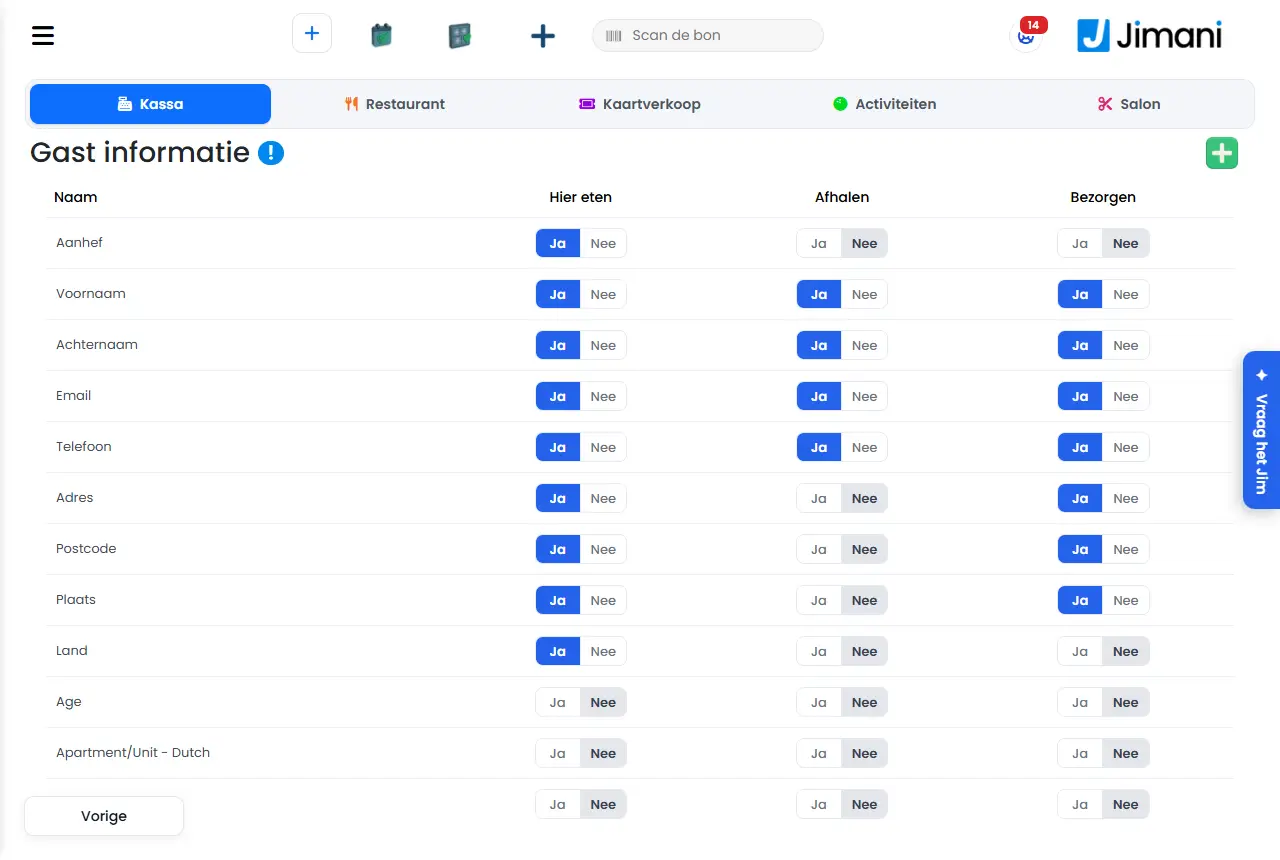
Under Guest information you decide which details a customer fills in when ordering in your webshop, and whether they are asked for eat here, pickup or delivery. With the plus you add a question of your own.
- Where to find it
Settings > Guests and bookings > Guest information (
/Settings/WebshopGuestDetails).- Explanation
The list shows each guest field with three switches: Eat here, Pickup and Delivery. A switch that is on means the customer sees that field for that type of order. Each switch is saved immediately, without a Save button. If it fails, you see Not saved with the reason. For a shop or treatment business, the name Sale appears instead of Eat here.
- Step 1. Click the plus at the top right to create a new field.
- Step 2. Under Name, enter the question, for each language of your business on its own tab.
- Step 3. Turn on the switches Visible In Here-Eating, Visible in delivery and Visible in takeout for the order types where you want to ask the question, and choose Save.
- Buttons and settings
Name What it does When to use it Note Guest information The title of the screen. - - Plus (new field) Opens the window Add customer details. For an extra question to the customer, for example a delivery instruction. - Name The name of the field as the customer sees it. Always. Required, in every language your business uses. Eat here On: the field is asked for eat here. To decide per order type what you ask. Saved immediately. Pickup On: the field is asked for pickup. Same. Saved immediately. Delivery On: the field is asked for delivery. Same. Saved immediately. Add customer details The window for a new field. At the top it says: Here you decide which details a customer fills in when ordering. For a new question. The block is called Guest field. Guest field A question the guest answers when ordering, and whether it is required. - This window has no option for required. Visible In Here-Eating On: the question appears for eat here. Per new field. - Visible in delivery On: the question appears for delivery. Per new field. - Visible in takeout On: the question appears for pickup. Per new field. - Save Creates the field. After filling it in. You see a confirmation and return to the list. Previous Closes the window without saving. To cancel. - - Messages
Message What it means What to do Not saved A switch could not be stored. Try again. Saved failed! The new field could not be stored. Check the name for all languages and try again. Your details have been saved! The new field is in the list. Choose OK. - Related
Which details does my webshop ask the customer when ordering?
- Where do I set which fields the customer fills in when ordering?
- How do I add an extra question to the order form?
- Why does it say Not saved at a guest field?
- What is the difference between the switches Eat here, Pickup and Delivery?
Keywords: webshop guest information, customer details ordering, extra question at order, fields delivery pickup, add guest field
Last checked: 2026-10-16
Translated from the Dutch knowledge base; the Dutch version is leading.