How do Announcements work in Jimani?
- Answer
With Announcements you prepare a message for your employees, with a start date, an end date and a type (Informative, Warning or Beware!). An announcement appears in the help centre on the chosen days, or only at the top of the reservation screen if you set Visible when booking to Yes.
- Where to find it
Menu > Announcements, or Settings > Communication > Announcements (
/settings/alerts)- Explanation
The Announcements page shows a list with Start date, End date, Name, Announcement, Cannot be deleted and Visible when booking. Click the plus button at the top right for the Add announcement window, or click a row to change it. You can turn the two checkmarks in the list on or off straight away. On Settings, the Announcements line only appears under the filter All, until you use it.
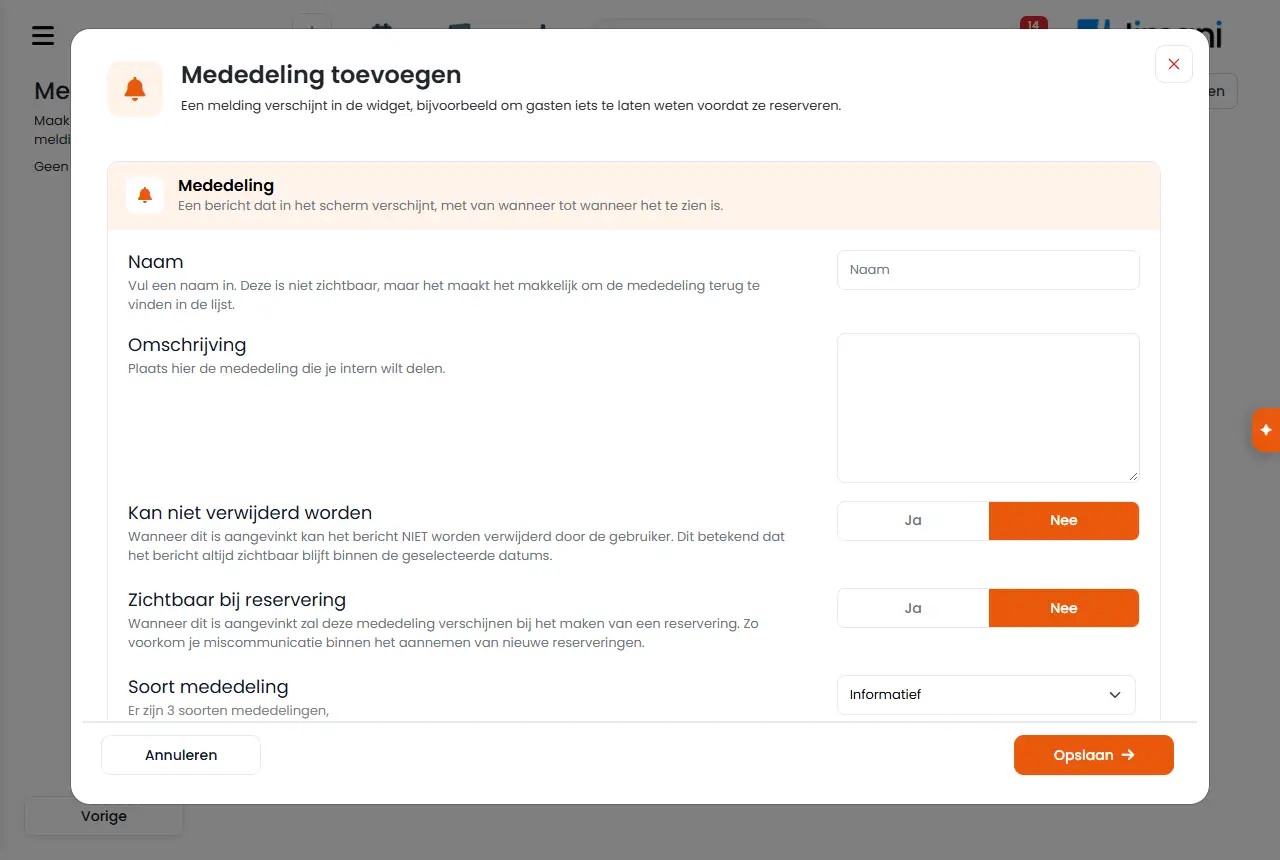
- Buttons and settings
Name What it does When you use it Note Create internal announcements for all employees and give them a priority status, so that everyone can act appropriately. You can show this notification for certain dates, but also only when booking. The explanation above the list. - - Name Enter a name. It is not visible, but it makes it easy to find the announcement in the list. Always. At most 50 characters. Description Enter the announcement you want to share internally here. Always. At most 3000 characters. In the list this column is called Announcement. Cannot be deleted Yes: when this is checked, the message can NOT be deleted by the user. This means the message always stays visible within the selected dates. For something everyone must read. Default No. Visible when booking Yes: when this is checked, this announcement will appear when creating a reservation. This prevents miscommunication when taking new reservations. For example "Terrace closed today". Default No. With Yes it appears at the top of the reservation screen for that day, not in the help centre. Type of communication There are 3 types of announcements: Informative, Warning and Beware!. To show how important it is. - Date Enter the start date here, when the notification should become visible. Always. A date in the past is not allowed. End date Enter the end date here, until when the notification is visible. Always. Must not be before the start date. Save, Cancel Saves the announcement or closes the window without saving. - - Edit the notification that appears in the widget. The explanation in the window to change an announcement. - See Note. A notification appears in the widget, for example to let guests know something before they book. The explanation in the Add announcement window. - See Note. - Messages
Message What it means What you do No data found. There are no announcements yet. Create one with the plus button. Your details have been saved! The announcement has been saved. - - Related
How do I prepare an announcement for my employees?, What is in the Jimani menu?
- How do Announcements work?
- What is the difference between Informative, Warning and Beware?
- How do I show a notification at the top of the reservation screen?
- How do I change an existing announcement?
Keywords: employee announcement, internal notification, staff message, reservation announcement, warning notification
Last checked: 2026-10-16
Translated from the Dutch knowledge base; the Dutch version is leading.