How do the Locations of Activities management work in Jimani?
- Answer
A location is a lane, room, boat or anything else that you rent out per time period. Under Activities management > Locations you create locations with a name and a capacity (the number of people), decide whether guests can book them online and link them to activities.
- Where to find it
Activities management > Locations tab (
/Activities)- Explanation
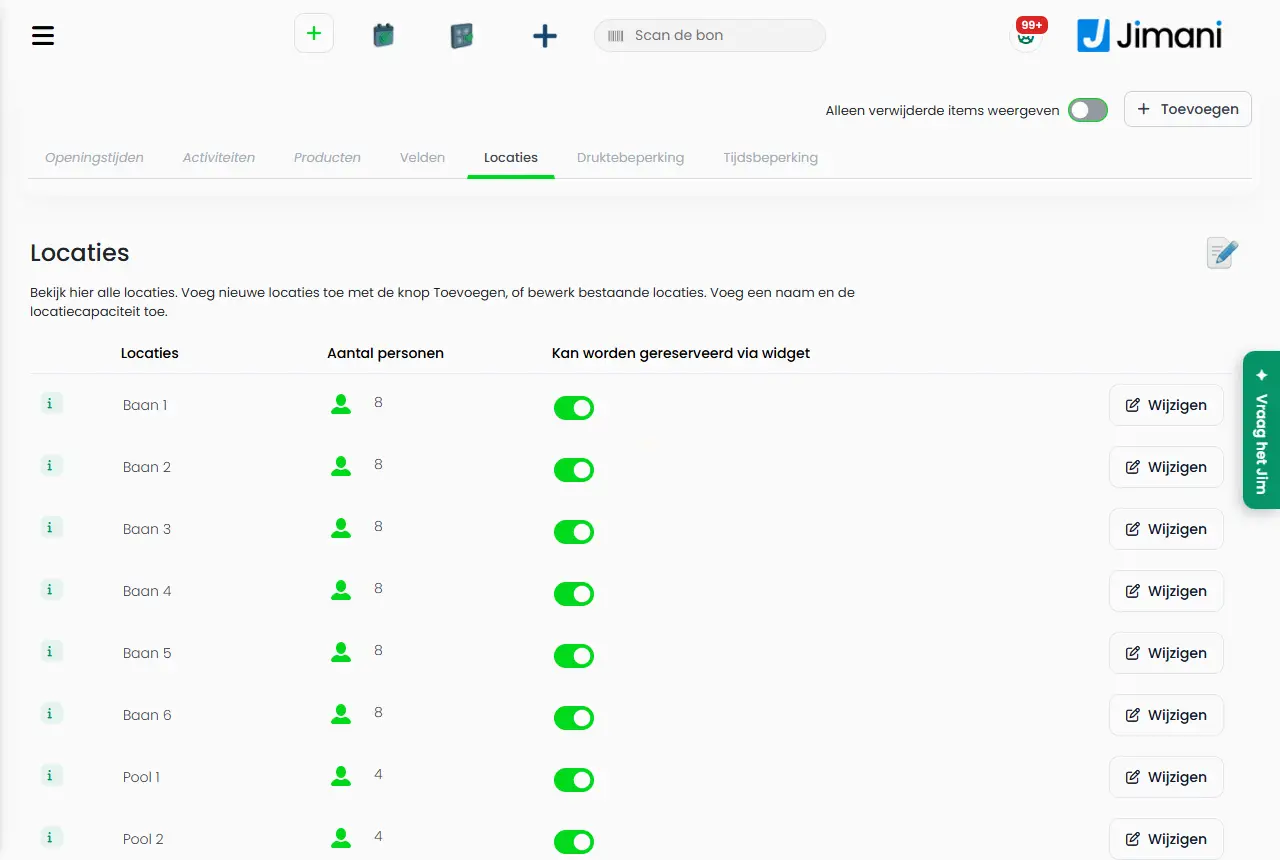
The Locations tab shows a list with the columns Locations, Number of guests and Can be reserved via widget and on each row the button Edit. The screen says: "View all locations here. Add new locations with the Add button, or edit existing locations. Add a name and the location capacity." With the plus button you create one or more at once (up to 50). The edit icon puts the list in edit mode, where you change names and numbers and delete several locations at once. A click on the number of people gives a minus and a plus; every step is saved immediately. The step-by-step version is in How do I set up locations and capacity for my activities?.
- Buttons and settings
Name What it does When to use it Please note Number of locations The number of locations that you add in one go. On the screen: "How many locations do you want to add?" For a new series of lanes or rooms. From 1 to 50. Location name and maximum quantity of guests A name and a capacity for each location. On the screen: "Location name and maximum quantity of guests". The example shows Location 1, Location 2 and so on. Always. The name is a maximum of 50 characters. Number of guests The capacity of the location. On the screen: "Indicate the capacity of the location." Always. At least 1. For a booking, Jimani looks for the smallest free location that fits the guests. Name The name of the location. On the screen: "Enter a name. The name is only visible internally." With Add new table from an activity. Only visible internally. Can be reserved via widget Determines whether guests can book the location online. On the screen: "When this is active you can reserve or buy this via the widget. When it is off it will not be visible." Set to No for locations that you only book yourself. The location can still be booked in the dashboard. Edit Opens the Locations window with the details of the location (the title shows the name). To change a name or number. On the screen: "Modify an existing location." Delete Deletes the location after the question Delete location / Are you sure? If the location no longer exists. - Change the number of people The number in the list; click it for a minus and a plus. For a quick change. Every step is saved immediately. Save Stores the new locations or the changes in edit mode. After filling in. - - Messages
Message What does it mean What do you do Please select at least one table to delete. You have not ticked a location. Tick a location first. Deleting tables The question to delete several locations. Confirm with Yes or cancel. - Related
How do I set up locations and capacity for my activities?, Why can't a guest see available times for my activity?, How does Activities management work in Jimani?
- How do I create a lane or boat to rent out?
- Can guests book a location online themselves?
- How do I set the capacity of a location?
- How do I link locations to activities?
Keywords: activity locations, add lane, location capacity, number of people lane, delete location, can be reserved via widget
Last checked: 2026-10-16
Translated from the Dutch knowledge base; the Dutch version is leading.