How do the Products of Activities management work in Jimani?
- Answer
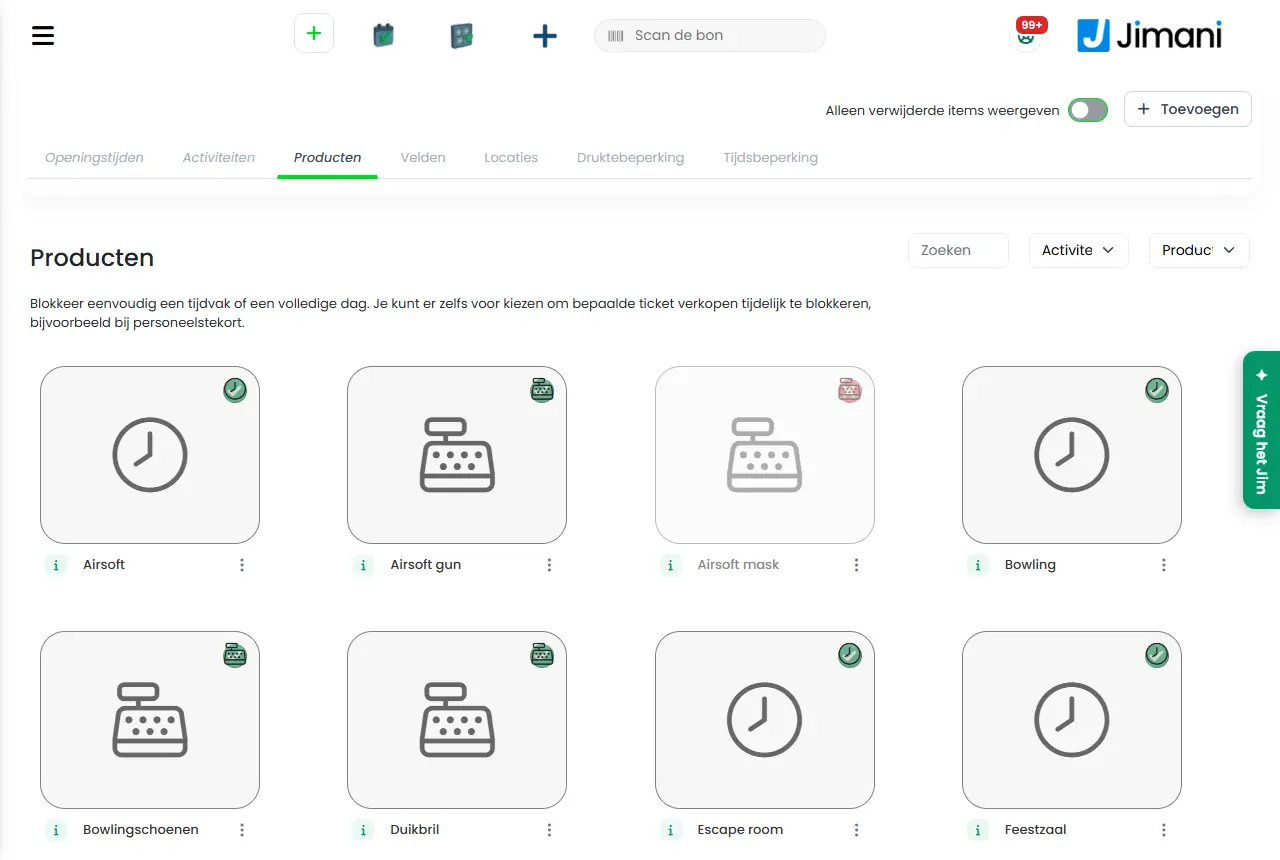
Under Products you create what a guest buys or rents with an activity: the Main product with its price per time or per person, an Extra product and Transaction costs. You create them with a window of steps (Products) and change them later with the same window. Each product gets a Name, a VAT group and a price.
- Where to find it
Activities management > Products tab > plus button > Products (
/Activities)- Explanation
The window starts with three choices: Main product, Extra product and Transaction costs. If you choose Main product, you then choose under Choose a product type between Price per time and Price per person. Price per time has steps for name, VAT group and time blocks, for the extra time and the start times, and for the price table per date. Price per person has name, description, photo, extra time, start times, VAT group and up to five prices. The Products tab has filters on Activity and Product types and a menu Actions on each tile. At the top of the tab there is currently the text "Easily block a time period or a whole day. You can even choose to temporarily block certain ticket sales, for example in case of a staff shortage." That text is about the Time limitation; under Products you do not set a time period. See Which pricing model can I choose? and How do I set the price per duration?.
- Buttons and settings
Name What it does When to use it Please note Choose a product type Chooses between Price per time and Price per person. On the screen: "There are 2 product types, "Price per time" and "Price per person". Both work in a different way." For a new Main product. You choose the type when creating. Name The name of the product, maximum 50 characters, per language. On the screen: "Enter a name. The name is visible for all types of reservations." Always. Required. Description Text about the product. On the screen: "Give more information about the product if needed. Please note, this information is visible while booking." For Extra product: "Give the product a description. The description is visible when booking via the widget." To tell what the guest gets. Visible to the guest. VAT group The VAT group of the product. On the screen: "Select the VAT group" (when changing: "Choose the VAT group"). Always; it determines the VAT percentage. Required. Time blocks The durations that you sell with this product (only Price per time). Turn on at least one duration, otherwise you get Select at least one time. To determine which durations a guest can choose. If a duration is not there, use the plus button. See Time blocks. Extra time between reservation Time that you keep free after a booking. On the screen: "In some cases it can be useful to keep extra time free between bookings, for example for cleaning." You choose a number and a unit (Minutes, Hours in advance or Day). For cleaning or changeover. The location is occupied during that time. Preferably choose Minutes. Can be booked per? The step the start times follow. On the screen: "Indicate here at what time interval within each hour the activity can be booked. If you set this to 15 minutes, for example, bookings can only be made at XX:00, XX:15, XX:30 and XX:45 within the opening hours." For Price per person: "How many minutes apart may a reservation take place? If you set this to 15 minutes, the booking steps are always per quarter of an hour on the full hour. So 14:00 or 14:15 or 14:30 or 14:45 etc. If you set the step to 1 hour, you can only book on the full hour." To determine at which minutes a guest can start. Choices: 5 to 45 minutes in steps of 5, or 1 hour. Select Excel file Chooses the Excel file with the prices to import. To fill in many prices at once. Export first, then fill in. Choose a file The button to find the file. When importing. Only .xlsx. Price The amount. For Main product with Price per person there are up to five prices (the names come from your widget): "Enter the product price. This is per person, and including VAT." For Extra product: "Enter the price. The amount includes VAT." For Transaction costs: "Enter the price per reservation here. Please note: the price includes VAT." Always, except with Price per time (there the price is in the table per date). All amounts include VAT. Second to fifth price The extra price lines of Price per person, with the names from your widget (for example Children). If you have more types of guests than one. On the screen there is still a technical text here instead of an explanation. Show in widget Shows the Extra product in the widget. On the screen: "Indicate whether the field is visible while booking via the widget." If guests may choose it online. Only visible with the Online reservations add-on. Active Turns the product on or off. On the screen: "Turn the product on or off. A product that is turned off cannot be chosen." Not needed. Is hidden in the window; use Deactivate in the Actions menu. Delete Deletes the product (to the trash) after a confirmation. If you no longer use the product. See Turn off, copy, delete. Previous To the previous step. - - Next To the next step. - - Save Stores the product. On the last step. You see Created. and Your details have been saved! - Messages
Message What does it mean What do you do Select at least one time. You have not turned on a time block. Turn on at least one duration. No table found The price table was not loaded when importing. Open the last step and try again. Select a year No year was chosen when importing. Click one of the three years. No data found The Excel file contains no readable lines. Use the file that you exported. Data has been applied The prices from the file are in the table. Click Save to keep them. Error loading products. See the console for details. The list of products could not be loaded. Reload the page; if it keeps failing, contact us. - Related
How do I set the price per duration with time blocks?, How do extra products and transaction costs work for an activity?, How does the Add or change activity window work in Jimani?
- What is a main product for an activity?
- Which details does a product for an activity have?
- How do I set the VAT of a product?
- How do I change an existing product?
Keywords: product activity, main product, extra product, transaction costs, VAT group product, time blocks product, add product, price per person
Last checked: 2026-10-16
Translated from the Dutch knowledge base; the Dutch version is leading.