How does the salon's Refunds overview work?
- Answer
In the Refunds overview you see the cancelled appointments of the last six months and you refund amounts paid online, in full or in part. The balance at the top shows how much is available with your payment provider to refund.
- Where to find it
Menu > Refunds overview (
/SalonRefunds)- Explanation
At the top is Balance with an amount. Below it is a line per cancelled appointment. If the appointment was paid for, the last column, Status, has two buttons: the red one to refund and the orange one to cancel a refund in progress. With the information icon at the front of the line you open the reservation information. Double-click a line to open the appointment itself.
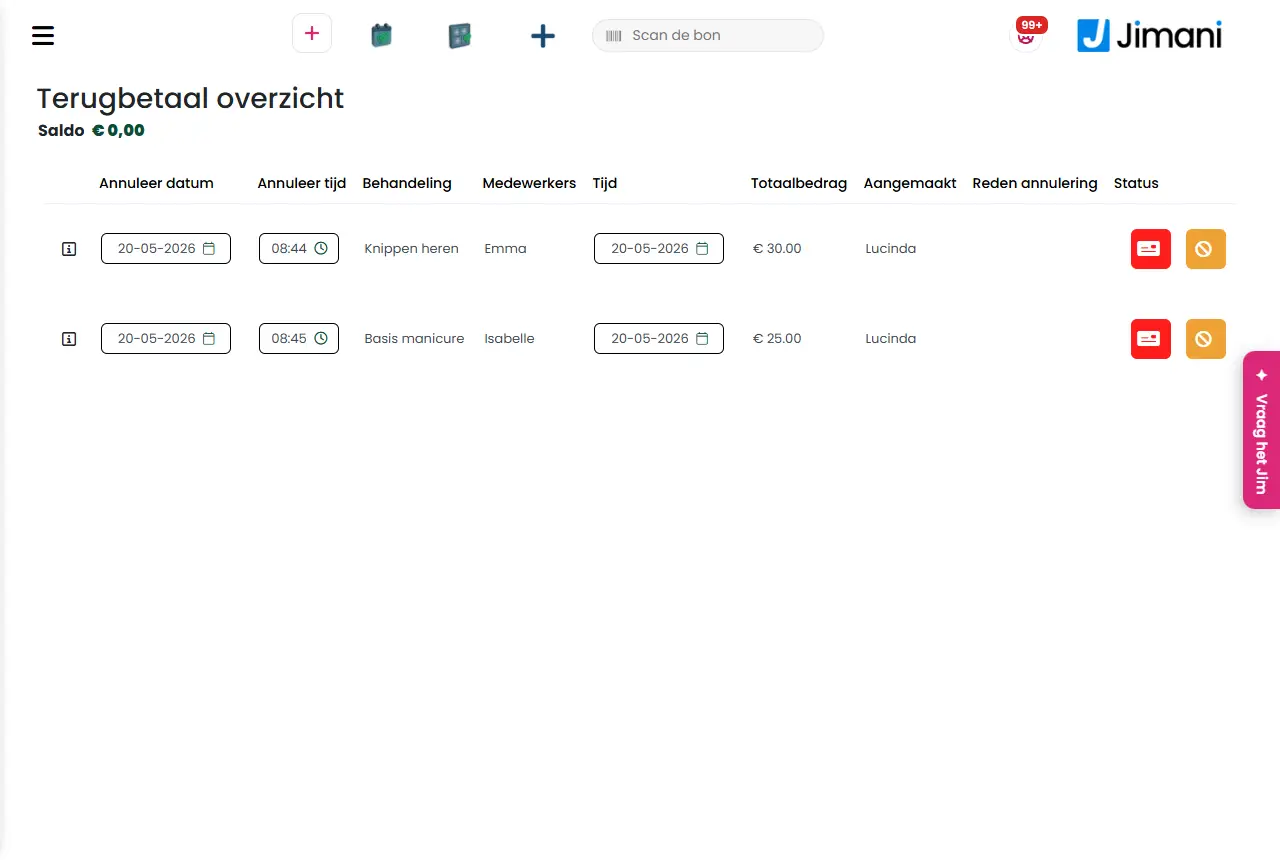
- Buttons and settings
Name What it does When you use it Note Balance The amount you have available with Mollie. To see whether you have enough. Without a link to Mollie it shows 0. The balance is remembered briefly, so it may lag behind for a moment. Cancellation date Column: the day of the cancellation. - - Cancellation time Column: the time of the cancellation. - - Treatment Column: the treatment. - - Employees Column: the employee. - - Time Column: the day of the appointment. - - Total amount Column: what the guest paid. To see how much you can refund. - Created Column: who made the cancellation. - - Cancellation reason Column: the reason that was given. - - Status Column with the buttons to refund or cancel a refund, or the state of the refund. To handle it. If the total amount is 0, there is nothing to refund and the box stays empty. Refund The red button with the bank card symbol. You enter which amount you refund; the full amount is already filled in. After the cancellation of a paid appointment. The amount may not be higher than what the guest paid, and not higher than the Balance. Cancel refund The orange button with the cross. Jimani asks Are you sure? with the text You are going to cancel the refund!. Only as long as the refund has not yet been carried out (pending). After that you can refund again. Excel Icon that downloads the list. For an export. - - Messages
Message What it means What you do Refund amount! Title of the window in which you enter the amount. Enter the amount and confirm. Total refund amount: The text above the entry field. - Max. refund amount is You entered more than was paid. Enter a lower amount. Insufficient balance! The amount is higher than your Balance. Wait until there is balance or refund a lower amount. Are you sure? Question before a refund is cancelled. Choose Yes or No. No data found. There are no cancelled appointments in the last six months. - - Related
How do I refund a cancelled appointment?, How does the salon's Cancellations overview work?
- How far back do I see cancelled appointments for refunding?
- What does the balance at the top of the refunds overview mean?
- Can I refund part of the amount?
- Where do I refund appointments paid online?
Keywords: refund salon, cancellation refund, deposit refund, mollie refund, mollie balance, partial refund
Last checked: 2026-10-16
Translated from the Dutch knowledge base; the Dutch version is leading.