How does the Send from your own address screen work in Jimani?
- Answer
On this screen you connect your own email address, so that confirmations, reminders, invoices and newsletters are sent from that address. At the top is the Status; below it you choose an address and a way of connecting in two steps. The screen only exists if the add-on Send from your own address is turned on (€10 per month).
- Where to find it
Settings > Communication > Email, tab Send from your own address (
/EigenAfzender)- Explanation
Without a connection, the Status block says that emails are sent from noreply@jimani.nl, with replies going to the address of your business. The block then shows the status of your connection: waiting for DNS records, connected or revoked. If sending from your own address fails once, the email still goes out via Jimani, with replies going to your business. A Last message at the bottom of the Status block shows the last error message with date and time. You find the steps in How can I send email from my own email address?.
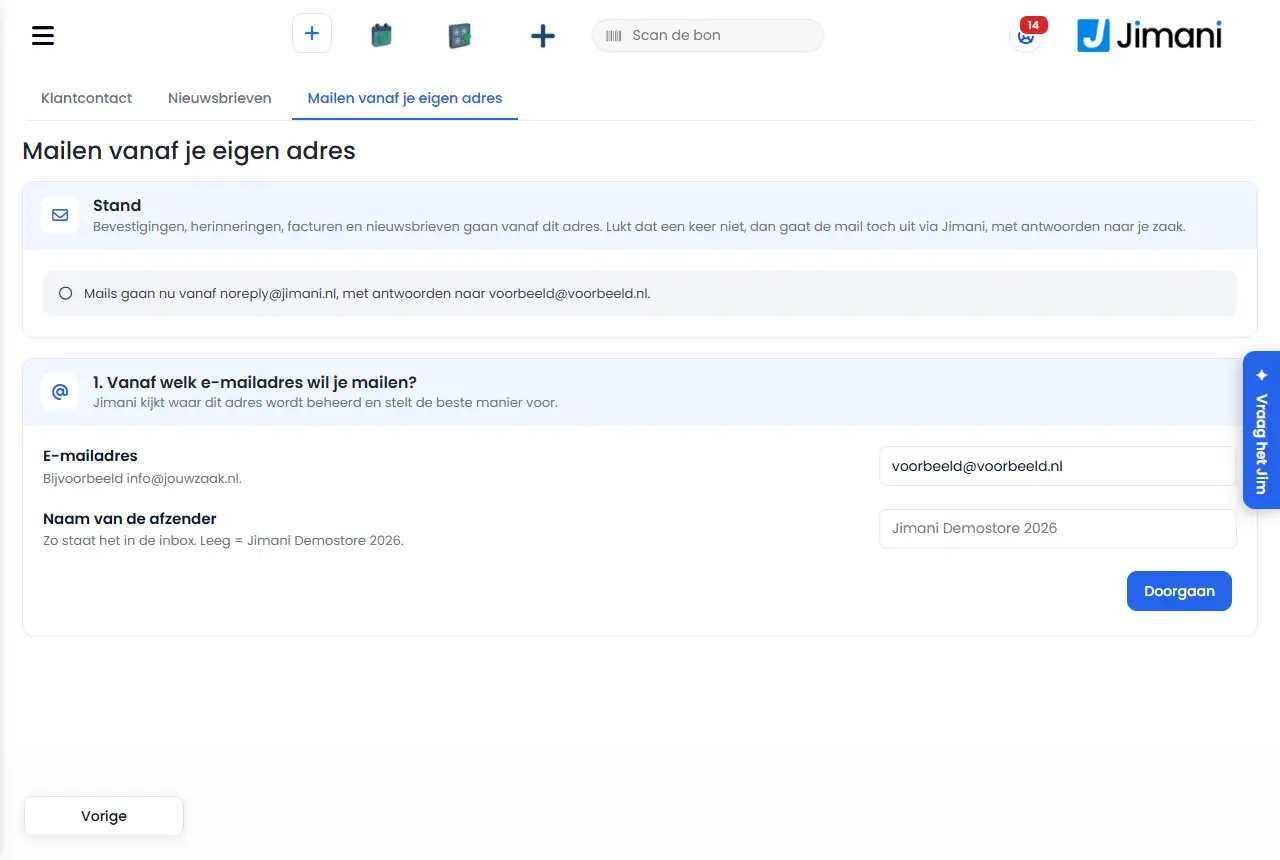
- Buttons and settings
Name What it does When you use it Note Email address The address you want to send from Step 1. Which email address do you want to send from? By default the address of your business; for example info@yourbusiness.nl Sender name The name in your guest's inbox Step 1 Maximum 100 characters; empty = the name of your business Continue Checks where the address is managed and shows the routes After entering the address Jimani says who manages the address, for example Google Workspace, Microsoft 365 or your own provider Verify your own domain Route with three DNS records, marked as recommended for your own domain For an address on your own domain Turned off for a free address such as gmail.com Create the DNS records Creates the three records and shows them After choosing Verify your own domain You add them to your domain yourself Check Checks whether the DNS records are correct After the records are in place Can take a few hours after adding them Let your web developer do it, Send the records Emails the records to your web developer's address If someone else manages your domain Without an address: Enter your web developer's email address. Type, Name (host), Value, Status The columns of the DNS table; Status shows correct or not yet When adding the records Copy with the copy icon; no dot at the end of a CNAME, proxy (Cloudflare) off Own mail server (SMTP), Enter details Route with the details of your mailbox If you cannot add DNS records With Google and Microsoft often with an app password Outgoing mail server The server through which the email goes With SMTP Suggested by Jimani based on your provider Port The port of the server With SMTP Usually 587 Username The login of the mailbox With SMTP Usually your email address; empty = the address above Password The password or app password With SMTP Saved; leaving it empty = no change Test connection and link Tests the connection with a real test email and connects After entering the details Only saved on success Connect with Google or Microsoft, Google, Microsoft Log in with your account For an address at Google or Microsoft (also gmail.com and outlook.com) If it says "Not available yet", that connection has not been set up Test email Sends a test email from your own address After connecting The message shows whether it really went from your own address Reconnect Takes you back to logging in with the same provider If the connection has been revoked or has expired Until then emails go via Jimani Disconnect Removes the connection If you want to send via Jimani again Jimani first asks for confirmation Start over Resets the pending connection If you are waiting for DNS records and want something else Emails go via Jimani in the meantime - Messages
Message What it means What you do Start at step 1 first. You clicked Check or Send the records without DNS records having been created First enter an address and create the DNS records {0} is managed by {1}. Jimani has recognized where the address is hosted (for example: info@yourbusiness.nl is managed by Google Workspace) Choose the recommended route An address from {0} is not yours but the provider's; you cannot verify that. Use an address on your own domain, or connect your own mail server. You chose Verify your own domain for a free address Use SMTP or log in with Google or Microsoft {0} is an address from {1}: that domain is not yours, so verifying is not possible. Connect your mailbox with the details of your mail server. A free address; logging in has not been set up Choose Own mail server (SMTP) {0} is an address from {1}: that domain is not yours, so verifying is not possible. Connect with your {2} account or with the details of your mail server. A free address; logging in is possible Choose Google or Microsoft or SMTP your own provider What Jimani fills in if the address is not at Google or Microsoft - DNS records for sending from {0} Subject of the email to your web developer, and the heading of the DNS block - Hello, {0} wants to send email from {1} via Jimani. Would you like to add these three DNS records to the domain {2}? Start of the email to your web developer - For a CNAME, do not put a dot at the end, and keep 'proxy' (Cloudflare) turned off. After that the business can click Check in Jimani. End of the email to your web developer - Name (host) Column heading in the email to your web developer - Sent to {0} The email with DNS records has been sent Ask your web developer to add them Sending failed. The email to your web developer did not arrive, or the test email could not be sent Try again Creating it failed. The DNS records could not be created Try again Enter the server and the port (usually 587). Server or port is missing for SMTP Enter both Enter the password. No password is known yet Enter the password or app password This mail server cannot be reached from the internet. Enter your provider's server. The address of the server is not public Use your provider's server Test email: sending from your own address Subject of the test email with SMTP - This email comes through your own mail server. Connecting worked. Text of that test email - Success: there's a test email in {0}. All emails are now sent from {1}. SMTP connected Check your inbox for the test email Your address hasn't been verified yet. A test email is not possible before the address is verified First finish the connection There is no email address to send the test email to. There is no address for the test email Log in with an email address Test email from {0} Subject of the test email with your business name - This email was sent from {0}, just like all your confirmations, reminders and invoices will be. Text of that test email - The connection has been revoked. Reconnect; until then emails go via Jimani. Access to Google or Microsoft has been revoked or has expired Click Reconnect Disconnect? Emails will then go via Jimani again, with replies going to your business. Question on Disconnect Confirm with Disconnect or choose Cancel Disconnected. Emails go via Jimani again, with replies going to your business. Your address has been disconnected - Connecting with {0} is not available yet. The connection with Google or Microsoft has not been set up Choose SMTP or DNS records You did not give permission. Nothing has been connected. You refused at Google or Microsoft Try again and give permission Logging in did not work. Nothing has been connected. Logging in failed Try again This return does not belong to your request. Please try again. The return from Google or Microsoft did not belong to your session Start again No code came back. Please try again. Google or Microsoft did not send a code Start again Connecting with {0} did not work. Please try again. The exchange with Google or Microsoft failed Start again {0} did not return an email address. Please try again. Google or Microsoft did not give an address Start again Connected with {0}. All emails are now sent from {1}. Send a test email to see it. Connection with logging in succeeded Click Test email Enter a valid email address. The address is not right Check the address The email could not be sent from your own address; it was sent via Jimani. The test email went via Jimani, with the last error behind it Check the connection or reconnect - Related
How can I send email from my own email address instead of noreply@jimani.nl?, How do I connect my own domain with three DNS records?, How do I connect my mailbox via SMTP, Google or Microsoft?
- How do I see whether my own email address is connected properly?
- What does waiting for DNS records mean?
- From which address are my emails sent if I do not connect anything?
- Where do guests' replies arrive?
Keywords: own sender screen, connect own email address, dns records email, smtp settings, connect google, disconnect email
Last checked: 2026-10-16
Translated from the Dutch knowledge base; the Dutch version is leading.