How do hotel reservations, the room planner and the Create reservation side panel work?
- Answer
Under Hotel in the menu you see all reservations in the room planner (Overview), in lists per day, week or month and as totals. There you create a reservation yourself with Create reservation, and with a click on a reservation you open the Reservation information window.
- Where to find it
Menu > Hotel (
/HotelReservationViews). Jimani remembers the tab you used last.- Explanation
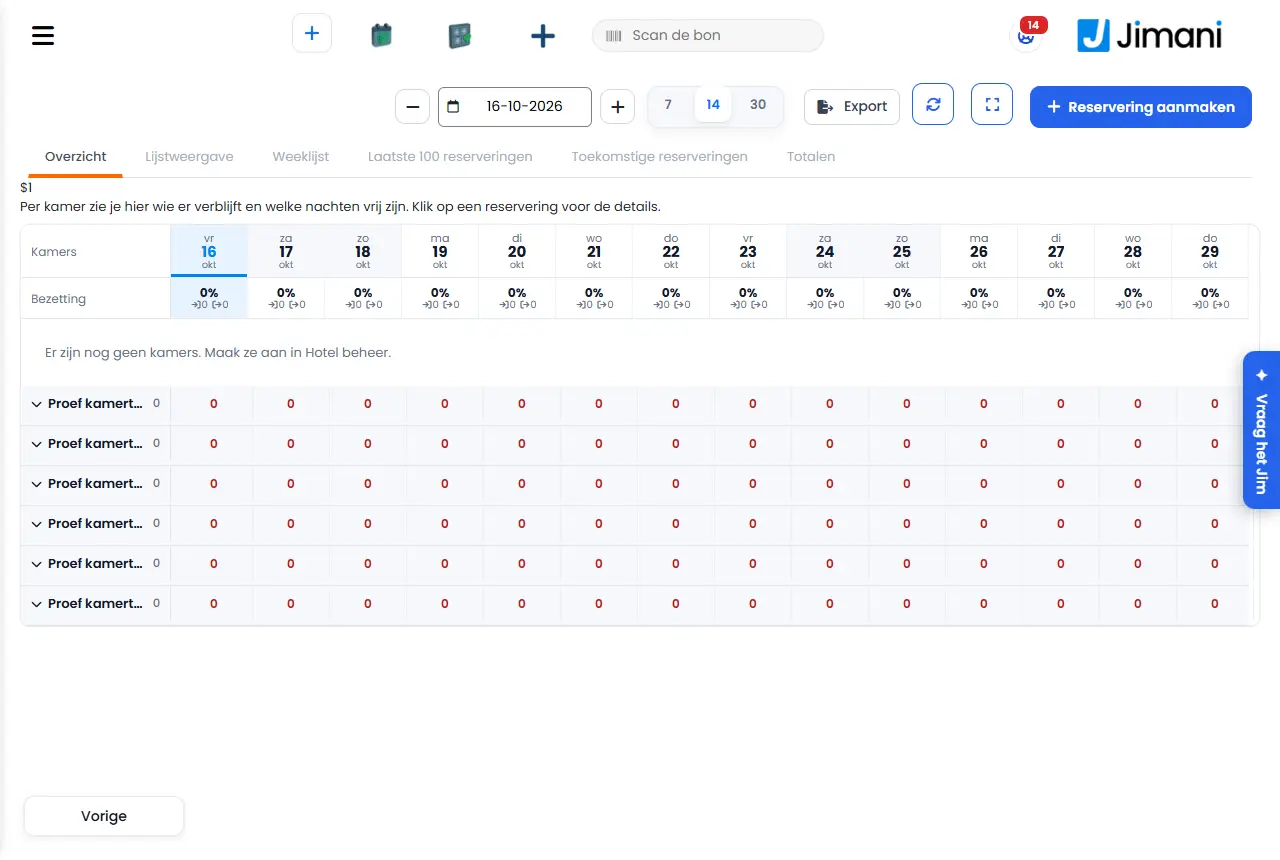
At the top are the date with a minus and a plus, the view of 7, 14 or 30 days (default 14), the buttons Refresh and Full screen, the Excel icon to export reservations, the guest register or the tourist tax, and Create reservation. The tabs are Overview, List view, Weekly list, Last 100 reservations, Upcoming reservations and Totals.
- Overview. Per room you see who is staying and which nights are free. Click a reservation for the details. A reservation is a bar from arrival to departure with the guest's name. Drag a bar to another room to move it, or drag the edge to extend or shorten it; it is saved immediately. For a holiday park it says: Per cottage you see who is staying and which nights are free. Click a reservation for the details. Click an empty cell for Create reservation with room and date already filled in.
- List view. Who arrives today, who is in the house and who departs today, in three blocks with the button Check in or Check out on each line.
- Weekly list. The reservations of the week of the selected date.
- Last 100 reservations. The last 100 reservations created.
- Upcoming reservations. Reservations that have yet to start, for the month you choose. You choose the month under Reservation for the month:.
- Totals. Per type the number of reservations, nights and people, the occupancy and the revenue of the arrivals. For the day and the week of the selected date.
- Buttons and settings
Name What it does When to use it Note Create reservation Opens the side panel on the right to make a reservation yourself. For a booking at the front desk or by phone. The plus button at the top. Arrival The first night of the stay. Always. With minus and plus you can shift the date by one day. Departure The day the guest leaves. Always. Must be after the arrival. Adults and Children The number of people. Always. Default 2 adults and 0 children, at most 20. Type and rate Per type you see how many are available and per rate plan what the whole stay costs. To choose type and plan. As long as you have not chosen anything, it says Choose a type and rate. At the front desk, minimum stay, no arrival and closed do not apply; occupied and closed do. Room or Cottage Choose a number yourself, or leave Automatic (first available). If the guest wants a specific room. Only available units are in the list. As an option (not yet confirmed) Yes or No. An option holds the spot, but the reservation is not yet confirmed. If the guest is still undecided. Default No. First name The first name of the person booking. For the confirmation and the lists. Next to the last name. Last name The last name of the person booking. Always. The last name is required. If first name and last name are both empty, Jimani reports Enter the guest's name. Email and Phone Contact details of the guest. For the confirmation. Without an email address you cannot send an email later. Comment A free-text note with the reservation. For requests. At most 1000 characters. Payment Pay now, Deposit or On arrival. Pay now: everything has been paid. Deposit: part has been paid. On arrival: the guest pays later. To record what the guest paid. It only records: the Mollie payment link and settling the bill go through the till. By default On arrival is on. Pay now Records that the full amount has been paid. If the guest has already paid. - Deposit Records that part has been paid. If the guest gave an advance. You then enter the Deposit amount. On arrival The guest pays later. Default. - Deposit amount The amount that has already been paid. Only with Deposit. - Total The total of the chosen stay. To check. - Save Creates the reservation. After filling in. Cancel closes the side panel. Internal memo A note only for you and your colleagues. The guest does not see this. For agreements within the team. Is in the Overview tab of the window. Edit details Changes the guest's first name, last name, email, phone and comment. If a detail is wrong. You save with Save. Send email Sends the confirmation again. If the guest has lost it. Only with an email address. Option and No-show Yes or No, in the window. Option: the spot is held, but the reservation is not yet confirmed. No-show: the guest did not come. For a waiting reservation. No-show is only available on or after the arrival day. Both are saved immediately. Check in Sets the guest to Checked in. When the guest arrives. If the room is not ready yet, Jimani asks Check in anyway? Check out Sets the guest to Checked out. When the guest leaves. If an amount is still outstanding, the till opens with the check-out bill. Cancel Cancels the reservation after a question with the cancellation fee according to the rate plan. If the guest does not come. Only possible with Confirmed, Option or No show. - Messages
Message What does it mean What do you do Cancellation fee according to the rate plan: {0} Cancelling now costs an amount. Choose Yes, cancel or No. Cancelling is free right now. There are no costs. Choose Yes, cancel or No. Room {0} is not ready yet ({1}). The room is Dirty, In progress or not yet inspected. Choose Yes, check in to continue anyway. Enter the guest's name. First name and last name are both empty. Enter at least the last name. No unit of this type is available in that period. Everything is occupied. Choose other dates or another type. Settle in the till first. An amount is still outstanding. Complete the check-out bill in the till. You cannot cancel a checked-in or checked-out reservation. Cancelling is only possible before check-in. Nothing, or check the guest out. - Related
How do I create a hotel reservation myself?, How do I move or extend a reservation in the room planner?, How do I check a guest in and out?
- How do I see all hotel reservations?
- What is the room planner?
- Where do I see reservations per day, week or month?
- How do I open the details of a hotel reservation?
Keywords: room planner, hotel reservations, create reservation hotel, check in guest, check out, option reservation, no-show hotel, move reservation
Last checked: 2026-10-16
Translated from the Dutch knowledge base; the Dutch version is leading.