What is on Users and User rights?
- Answer
On Users you create employees and change their details, role and PIN. On User rights the owner sets Yes or No per role and per section. Both are under Settings > Your business > Users and permissions, as two tabs.
- Where to find it
Settings > Your business > Users and permissions (
/CompanyUsers), User rights tab (/settings/roles)- Explanation
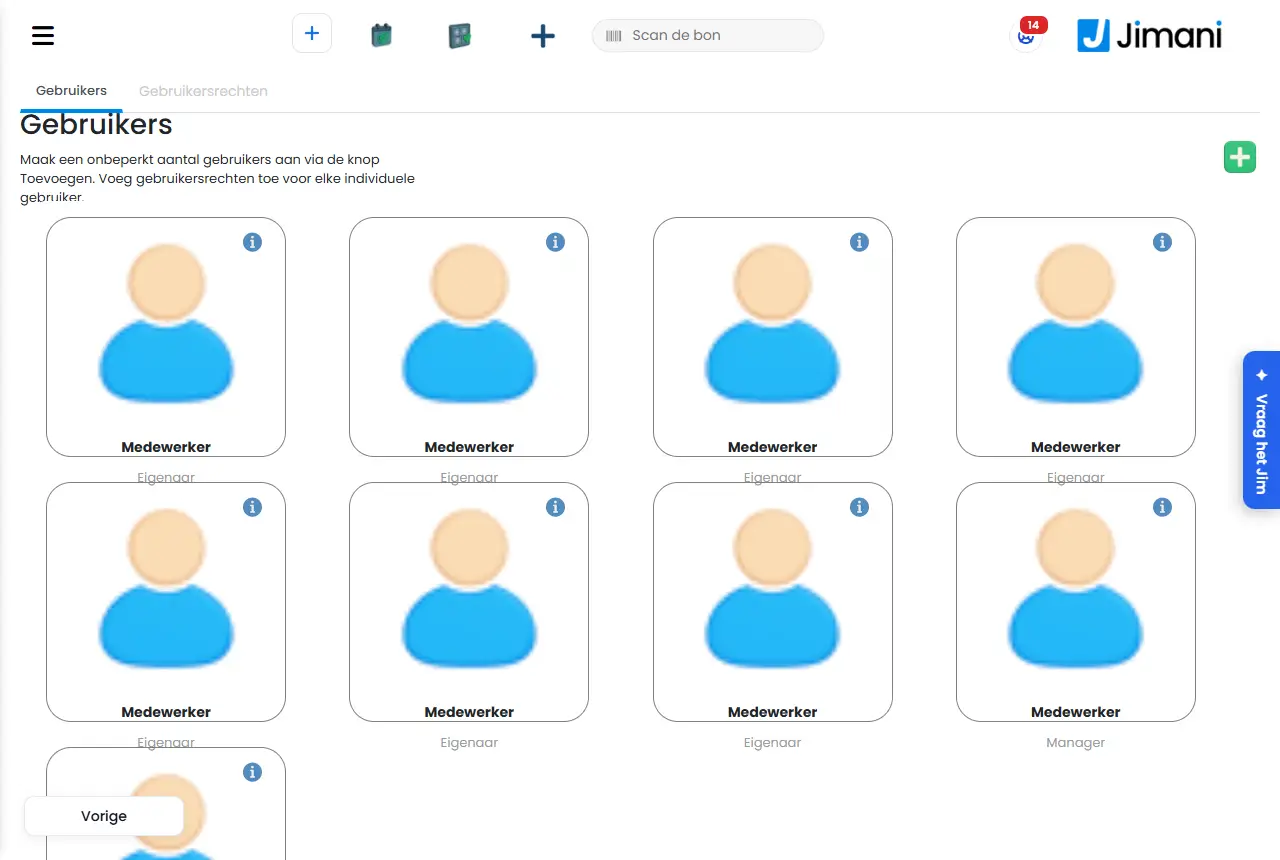
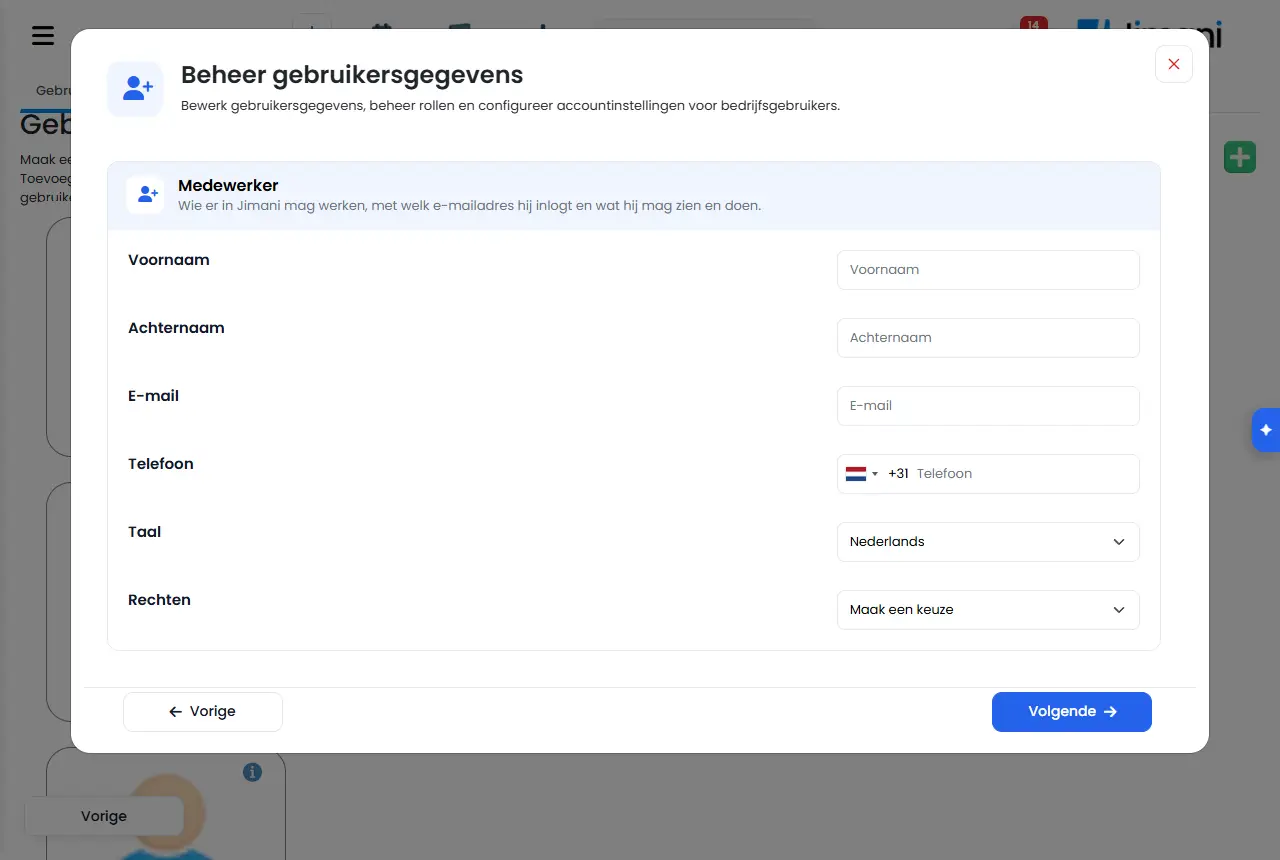
The Users tab shows a card per employee with name and role. Click a card to change it, or the plus button at the top right for a new employee. The window is called Manage user data and has two steps: first the Employee block, with Next to Contact details (and, with time tracking on, Employment details). With Save you store everything. On User rights you choose the Role at the top and set Yes or No per line; a change is saved immediately and you see Saved.
- Buttons and settings
Name What it does When to use it Please note Create an unlimited number of users with the Add button. Add user rights for each individual user. The explanation above the Users list. - The button is a plus sign at the top right. Edit user data, manage roles and configure account settings for business users. The explanation in the Manage user data window. - - First name, Last name The name of the employee; it is on the card and with their orders. Always. Required. Email The address the employee logs in with. A new employee receives an email on this to confirm it. For a new employee. If the account already exists at another business, it also comes to your business. Phone The mobile number, for login help and linking a POS by SMS. For a new employee. Required and a mobile number. Language The language in which the employee sees Jimani. Always. If you change the language and save, you are logged out and log in again. Rights The role of the employee: Owner, Manager, User, User2 through User5, and for a hotel Housekeeping. Always. You can only give a role that is lower than your own; the owner may do everything. POS PIN code The code the employee uses to log in on the POS. Exactly 4 digits. If Log in on the till is on. Empty for a new employee gives 1015, or a free code if 1015 already belongs to someone. Not 0000 and not the same as a colleague's. Postal code, Address, Place of residence The contact details of the employee. If you need them for the roster or payslip. - Personal email address, Phone number, Position within the company Extra contact details when changing an employee. As desired. - Staff number, Date of birth, Employed from, Employed until, Contract hours per week What the payroll provider needs. With time tracking on. Only the owner and the manager see and change this. Can log in Whether the employee has access to Jimani. Someone who never stands behind a screen does not need access; clocking is still possible. For someone who only clocks. Is on by default. Clocks hours Whether the employee clocks in and out on the POS. An owner usually does not clock. For whoever has to register hours. Only with time tracking on. Last login When the employee last logged in. To see whether someone uses Jimani. Only when changing. Set language The language that belongs to the account. - Only when changing. Email confirmed Whether the employee has already confirmed their email address. If someone cannot log in. Only when changing. Resend email validation Sends the confirmation email once more. If the email did not arrive. - Reset password Sends the employee an email to choose a new password. If someone has lost their password. - Delete Removes the employee from your business. If someone has left. The owner may always do this; someone else only with the Users right and only for an employee with a lower role. Role On User rights: the role whose rights you see and set. Always. Register device is last: that is not an employee but a linked POS without a PIN. Add role Puts the next free role (User2 through User5) in the list. It is kept as soon as a right is set on it. If you want an extra group of employees with their own rights. Only the owner. After User5 no more roles can be added. All Sets a whole block of rights to Yes or No in one go. To set up a role quickly. - Back to default Resets the rights of the Register device to the Jimani default. If you changed the POS role and want to start over. Only visible with Register device. Not for a register device This right can never be given to a POS without a PIN. - Applies to Users, Company Information, POS & Hardware, Export, Refund via Mollie at the POS, Everything about payments, Fiscalization, Integrations, Order POS and equipment and Accounting. - The old Users list
the task Add your employees with a PIN on your to-do list still opens the old list (
/settings/users). There it shows per employee First name, Last name, Email, Rights, Language, Last login and Confirmed, with the buttons Send activate email, Send reset password email, Edit and Delete. You create a new employee there with First name, Last name, Email address, Mobile number, Language and Rights, and Save. It works the same as the Users tab; you set the PIN on the Users tab.- The rights per block
these are the lines on User rights (you only see what belongs to your modules and add-ons that are turned on). In brackets is the name in the rights table if it is different.
Block Lines Reservations Reservations, Appointments, Cancellations, Request, Quotations, Search, Announcements and the overviews per module Restaurant Reservations, Floorplan, Restaurant management, Search POS and orders POS, Order management, Delivery, Takeaway, Eat here, POS connections and Points of sale (Where to buy), Printers and card terminals (Printers and terminals), POS & Hardware, Day closing, Discounts (Discount overview), Tokens, Gift cards, Labels (Label printing), Order POS and equipment (Tills and equipment), Repairs, Give discounts (Give discounts at the POS), Open cash drawer without a sale, Record own consumption, Deposit/withdraw cash (Deposit and withdraw cash) Refunds Refunds overview, Salon refunds, Returns at the POS (Refunds overview), Refund via Mollie at the POS (Refund via Mollie) Payments Everything about payments Stock and purchasing Stock (Stocks), Suppliers Purchasing Order suggestion and orders (Purchasing), Book receipt (Purchasing book receipt) Online store Products, Online store widget (Store Widget Setting), Online store customer details (Webshop Guest Details), Delivery settings (Header 5-EN), Eat here settings (Eat Here settings), Pickup settings (Pickup settings), Delivery area (Delivery postcodes), Busyness (Order Restrictions), Customers (Webshop CRM), Courses, Online store settings (Webshop settings) Reports and accounting View revenue and reports, Dashboard, Financial overview (Financial reporting), Financial overview POS (Financial overview), Progress (Progress report), Ticket sales progress (Ticket sales progress report), Accounting, Unpaid and no-show (Unpaid and No Show), Outstanding prepayments, Fiscalization, Revenue per employee Staff and hours Hours overview, Users Settings Settings, Company Information, Menu and settings (Menu & Settings), Customer contact, Newsletters, Send from your own address (EigenAfzender), Currency and VAT (VAT groups), Guest details, Combinations (Packages), Languages, Your app (Your App), Layout (Printing labels), Times of products (Time blocks), Widgets, Survey, Integrations, QR codes General Export, Filters, Print Other Rights without a fixed place, such as Jimani AI credit and Price per unit. The rights of the hotel settings (Advanced, Guest register & tourist tax, Online check-in, Housekeeping, Codes & keys, iCal calendars and Online payment) are here under their internal name, such as hotel-geavanceerd and hotel-codes Guest details Only with Guest details: who sees what on Yes: per guest field Yes (visible) or No ('hidden') per role - Messages
Message What does it mean What do you do Created. The new employee has been saved. Have them confirm their email address. Updated. The change has been saved. - Saved On User rights: the right is set as you set it. - Check the fields: the PIN may only contain digits. POS PIN code contains something other than digits. Enter 4 digits. You may not add a user with this role. The chosen role is equal to or higher than yours, or you do not have the Users right. Choose a lower role or ask the owner. You do not have the right to manage users. You can only change your own details. Your role does not have the Users right. Ask the owner. You cannot change your own role. You can change your other details. You are trying to change your own role. Have the owner do that. Only the owner can change the owner. The employee you are changing is Owner. Have the owner do it. You can only change users with a lower role than your own. The employee is at the same level as you or higher. Ask someone with a higher role. You cannot give a role that is equal to or higher than your own. The new role is too high. Choose a lower role. This account also belongs to another business and the role applies there too. Only Jimani or your dealer can change the role. You can change the other details. A role belongs to the account, and this account also works at another business. Ask Jimani or your dealer. You may not delete this user. You do not have the right, or the employee has an equal or higher role. Ask the owner. Only the owner can change permissions. Someone other than the owner tried to set a right. Have the owner do it. Only the owner can change rights. Here you see what each role may do. The explanation at the top of User rights for someone who is not the owner. - The owner may always do everything. These rights are fixed on. You chose the Owner under Role. - This is how a linked POS without a PIN works. If someone logs in with their PIN, their own rights apply. You chose Register device under Role. - First switch on the Anonymise guest details integration. You set a guest field while Guest details: who sees what is off. Set that line to Yes under Settings > Guests and bookings. Off: this role sees 'hidden' here, also in search, exports and details. The explanation for a guest field. - Extra field of your business. Off: this role sees 'hidden' here. The explanation for your own extra field. - - Related
How do I add an employee and decide what they may do?, What is in the Jimani menu?, How do Hours overview, My hours and Revenue per employee work?
- Where do I manage my employees?
- How do I change an employee's role or PIN?
- Where do I set the rights per role?
- Who may change user rights?
Keywords: users, user rights, employee role, set permissions, POS PIN, register device, delete employee, reset employee password
Last checked: 2026-10-16
Translated from the Dutch knowledge base; the Dutch version is leading.