Can I allow groups to book different components simultaneously?

Yes, this makes the system perfect for planning complex events such as corporate outings, weddings, or family days. Read more about it in the blog here.

Can I combine tables and locations for larger groups (combined tables)?

Yes, the system can automatically merge multiple tables or spaces to create one large group area. Read more here.

Can I create quotes for groups?

Yes, you can create a complete price quote and send it to the customer, who can then accept the quote online. Read more in this blog.

Can I accept tentative bookings for groups?

Yes, you can temporarily hold dates and times (take an option) until the customer’s final confirmation. Read more in this blog

How do I process large group bookings?

The system is optimised for groups, including the option to set group discounts, collective payment, and separate confirmations per participant if desired.

Can I book combinations with different times and a custom order?

Yes, customers choose the order and start times per component within the combination themselves. This gives them maximum freedom when planning. Read more here.

Can I link combination bookings to multiple locations?

Yes, you can create an itinerary, for example, lunch at location A and the activity at location B, which increases the flexibility of your offer. Read more about combination bookings in this blog.

Can I process different VAT rates in one combination booking?

Yes, this is crucial for accounting. The system automatically splits the VAT per component (e.g. meal, accommodation, activity) for you.

Can I make upselling mandatory?

Yes, you can make certain extras mandatory, for example, for the deposit, cleaning costs, or material costs.

Can I offer combinations as a package price?

Yes, you can offer packages, for example, a full-day package with a discount when booking several components at the same time. Read more in this blog

Can I dynamically upsell based on the chosen reservation?

Yes, Jimani is smart and displays relevant extras based on the selected activity. For example, a customer who goes bowling will be offered a beverage package. Read more here.

Can I add extra products or services during booking (upselling)?

Yes, you can offer extras such as beverage packages, souvenirs, upgrades, or parking tickets. On average, revenue increases by 20% through these smart extra offers. Read more here.

Can I combine (bundle) multiple activities in one reservation?

Yes, the power of Jimani lies in combination reservations. For example, customers can place a lunch, an activity such as bowling, and bicycle rental in a single booking.

Can I offer multiple languages for customers on the booking page?

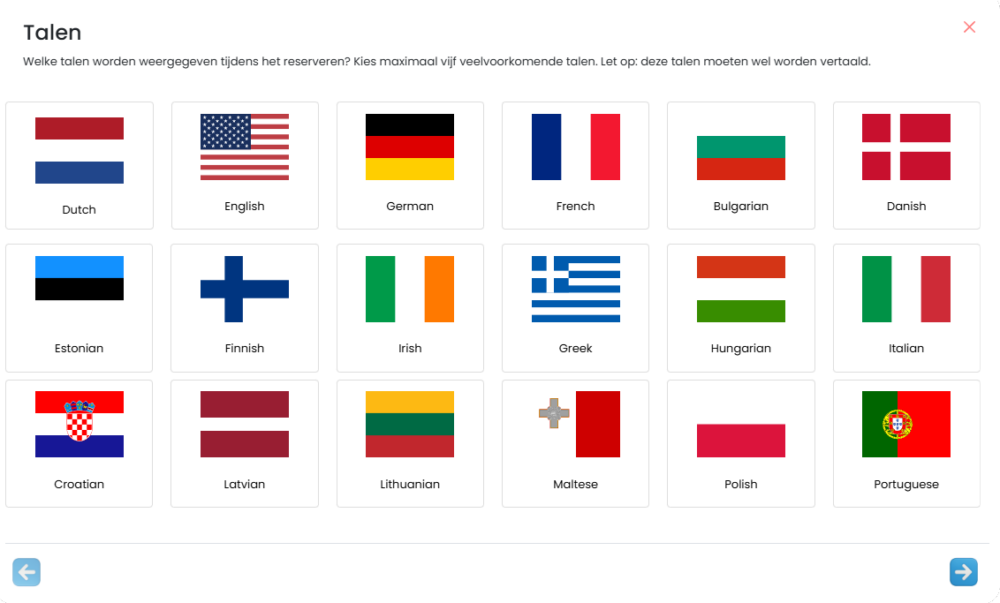
Yes, the system is available in 50 languages, including multilingual descriptions and booking pages. This improves the customer experience for international guests. Read more about it here.

Can I implement last-minute updates or price changes?

Yes, all changes you make in the system, including price changes and availability updates, are visible to customers in real time. Read more here.

Can I manage multiple branches or locations in one system?

Yes, you can manage unlimited locations, from restaurants to hotels, from one central Jimani account. This ensures clarity and efficiency.

Can I use Jimani on any device (desktop, tablet, smartphone)?

Yes, the system is fully responsive and works optimally on desktop, tablet, and smartphone, allowing you to log in and edit from anywhere. Read more here.

Can I link Jimani to my cash register system, POS or accounting package?

Yes, the system supports links via direct integrations or API. This streamlines the financial and operational processes. Read more about it in this blog.

Can I apply my branding and style (logo, colors) to the booking pages?

Yes, you can use your own logo, colors, and style. This ensures a professional and seamless brand experience for your customers. Read more here.

Can I grant different permissions to employees and users within the system?

Yes, you determine which functions are visible and editable for each user or employee. This ensures security and clear responsibilities. Read more here.

Can I manage different types of reservations simultaneously in one dashboard?

Yes, Jimani is an all-in-one solution. It combines reservations, ticket sales, webshop orders, and appointments in one clear dashboard, ensuring you never lose track. Read more here.

Which online payment methods are supported?

Jimani partners with Mollie, one of Europe’s leading payment solutions providers. Mollie provides a reliable and secure payment environment that supports all standard payment solutions per country, such as credit cards, iDeal, and PayPal. View the solutions and prices via this link.

Can I automatically send customers a survey for feedback after their visit?

Certainly, you can send a special survey per reservation type that you can really benefit from. This allows you to create an unlimited number of surveys for each type of ticket. You can customize the questions to the ticket type so that you get really good feedback.

With Jimani, you can set when the survey is sent. This can be as early as one hour, but also after a day. Or even the next day always at 1:00 PM.

Is the reservation system suitable for international guests (multiple currencies and languages)?

FAQ

Absolutely. Our system is designed for Europe. It supports all European currencies and is available in 27 languages, including the option for multilingual descriptions on your booking pages. Jimani is available in the following languages: Bulgarian, Danish, German, English, Estonian, Finnish, French, Greek, Hungarian, Irish, Icelandic, Italian, Croatian, Latvian, Lithuanian, Luxembourgish, Maltese, Dutch, Norwegian, Polish, Portuguese, Romanian, Slovenian, Slovak, Spanish, Czech, and Swedish.

Which online payment methods are supported for deposits and reservations?

Jimani partners with Mollie, one of Europe’s leading payment solution providers. Mollie provides a reliable and secure payment environment that handles all standard payment solutions per country, such as credit cards, iDeal, and PayPal. View the solutions and prices via this link.

What customer information and preferences can I view for a reservation?

With each reservation, you will immediately see the name, full contact details (phone and email), and any special requests (e.g., allergies or preferred seating) that the guest has provided. This data is stored in a customer profile for future personalization.

When you open the reservation, you will immediately see how often these guest(s) have visited, what their previous experience was like, and you will have access to their previous orders and spending patterns.

Can I flexibly manage my opening hours and exceptions (holidays)?

FAQ

Certainly. You can easily set regular opening hours, but exceptions and special times can also be added quickly. This is useful for holidays, events, or temporary closures, for example, ensuring an accurate availability calendar.

With Jimani, it is possible to link each type of reservation, such as dinner or lunch, to its own opening hours and time slots, so you can easily make certain spaces or days available only to groups. Read more here.

How do I know if children, babies, or animals will be accompanying the guests?

You can allow the guest to pre-select the number of adults, children, and babies when making the reservation. You can also easily add a high chair as an option to the reservation, so the guest can choose it themselves, or indicate other wishes.

How do I process group reservations and ensure all information is available?

Within Jimani, there are numerous options to streamline group reservations and display all information clearly and concisely. For example, for parties and events such as weddings, anniversaries, or corporate outings, you can create fields with questions like, “What time would you like to eat?”, “How many vegetarians should we consider?”, “Which drinks may be served?”, and so on.

Besides obtaining specific information per reservation type, Jimani allows you to easily create a quote, where you can immediately receive a deposit and confirm the event.

Or choose the inquiry option, so that every request for a group reservation no longer has to come in via email, but directly via the reservation widget.

Restaurant Reservation System Widgets

Can guests indicate special dietary requirements, allergies, or table preferences?

Yes, within Jimani you can create an unlimited number of fields that you link to a reservation type. This allows you to immediately request specific information during the reservation process.

Tip: For example, when you offer a reservation type such as a birthday dinner or children’s party, you can immediately use fields to ask for the name and age of the birthday person, so that you can prepare something if necessary.

This information is displayed in the reservation overview, so that it is always available to the service and kitchen staff.

How can I sell additional products, packages, or menus during the reservation process?

How can I sell additional products, packages, or menus during the reservation process?

With Jimani, you can add deposits per reservation type.

For example, for a special occasion such as a Christmas dinner, you can charge a deposit per person, such as €20.00 for adults and €10.00 for children, so you can be sure that you will not have any cancellations or no-shows and that you can purchase accordingly. You create a “Price per person” product and add it to each desired reservation type.

If you want to be able to sell extras as an option, you can create a product via “Extra products” and offer it during the reservation of that reservation type. Think of a wine package, a birthday surprise, or a decorated chair at a children’s party.

With Jimani, you have the option, in addition to adding products, to also add combination reservations. With a combination reservation, you can reserve activities or ticket sales while booking a table.

Restaurant Reservation System Widgets

Is it possible to link tables to specific zones, rooms, or the terrace?

Yes. You can link tables to specific zones (e.g., terrace, conservatory, bar, private room). This allows guests to indicate their preference and gives you, as the administrator, complete control over the optimal table allocation per zone.

Because all tables are linked to a specific space or zone, you can also set restrictions on these. This means that you can, for example, close off different zones for a period of time or days.

Can I set a maximum number of reservations or guests per time slot?

FAQ

Yes, with Jimani you have 2 choices: either a maximum number of guests per 15 minutes or the number of reservations per 15 minutes. With this “Peak Restriction” option, it is possible to spread out the peaks. Suppose you have 20 tables and all tables are reserved at 6:00 PM. This means that around 6:00 PM there will be a lot of people at the door who will all sit down at the same time, order drinks and want to eat. This large crowd has a major impact on the service and kitchen. If you set a maximum of 5 reservations per 15 minutes via the “Peak Restriction“, this means that there is more spread and therefore more peace of mind. When 5 reservations have been made at 6:00 PM, 6:00 PM will be displayed as full during the reservation process and 6:15 PM will be the next available reservation time.

Can I spread out the crowds and better distribute my peak and off-peak hours?

FAQ

Yes, with Jimani you have 2 choices: either a maximum number of guests per 15 minutes or the number of reservations per 15 minutes. With this “Crowd Restriction” option, it is possible to spread out the peaks. Suppose you have 20 tables and all tables are reserved at 6:00 PM. That means that around 6:00 PM there will be a lot of people at the door who will all sit down at the same time, order drinks and want to eat. This large crowd has a major impact on the service and kitchen. When you set via the “Crowd Restriction” that, for example, a maximum of 5 reservations may be made per 15 minutes, this means that there is more spread and therefore peace. When 5 reservations have been made at 6:00 PM, 6:00 PM will be displayed as full during the reservation process and 6:15 PM will be the next available reservation time.

Is it possible to automatically forward reservations to the kitchen or point of sale (POS) system?

Almost. Jimani offers integrations with various point of sale (POS) systems and can automatically forward reservation information, including ordered products, to the cash register and kitchen. There are many POS systems, so if your brand of POS system is not yet linked to Jimani, we will address this request as soon as possible. Read more here.

Can I view the tables and floor plan in real time?

FAQFAQ

Yes, you can in 2 ways.

  • Via the floor plan. In the floor plan you will find an overview of all tables, reservations and their status.
  • Via the reservation overview pages. In this overview you will find a schematic representation of all reservations for today, the week, or new reservations.

Read more here.

Does Jimani Online offer the option to request deposits or full payments upon reservation?

With Jimani, you can add deposits per reservation type.

For example, for a special occasion such as a Christmas dinner, you can charge a deposit per person, such as €20.00 for adults and €10.00 for children, so you can be sure that you will not have any cancellations or no-shows and that you can purchase accordingly. You create a “Price per person” product and add it to each desired reservation type.

If you want to be able to sell extras as an option, you can create a product via “Extra products” and offer it during the reservation of that reservation type. Think of a wine package, a birthday surprise, or a decorated chair at a children’s party.

With Jimani, you have the option, in addition to adding products, to also add combination reservations. With a combination reservation, you can reserve activities or ticket sales while booking a table.

Restaurant Reservation System Widgets

How do I and my colleagues receive a notification upon cancellation?

A cancellation is never pleasant, but it is certainly much better than a No-show. A cancellation is automatically placed back as an open position and can therefore be reserved again.

The guest can always cancel their reservation, and when this is done, there are 2 possibilities:

  • It concerns a reservation for which no payment has been made.

You can find the reservation in “Cancellations,” and there is a notification, so you are always aware of cancellations.

  • It concerns a reservation for which a payment has been made.

You can find the reservation in the “Refund Overview.” Here, you have the choice to refund the guest’s deposit, a portion of the amount, or even not refund the full amount. This, of course, depends entirely on your return policy.

How can I significantly reduce no-shows?

You can significantly reduce no-shows by utilizing two effective features: automatic reminders and the option for mandatory deposits. This combination ensures greater guest engagement, resulting in a lower dropout rate and more stable revenue. Read more here.

How can I inform my colleagues/employees about important matters or announcements?

You can easily share important messages or instructions via “Announcements.” The announcements will be visible to everyone on a set date. The announcement can always be visible, or only when someone manually makes a reservation.

There are 3 types of announcements you can use:

  • Informative announcement
  • Warning announcement
  • Attention announcement

Read more here.

Is it possible to add reservations manually (e.g., phone bookings)?

FAQ

Certainly. In addition to online bookings received through the widget, you can manually add reservations yourself in the system. This is essential for registering telephone bookings, walk-ins, or on-site appointments, ensuring that your overview of the day is always complete.

A manual reservation is created in such a way that it takes a maximum of 10 seconds, so you can quickly move on.

Can Jimani prevent double bookings?

FAQ FAQ

Absolutely. Our system operates in real time and uses advanced algorithms to update availability instantly. Once a table is booked, it is blocked for other reservations, effectively preventing double bookings and optimizing occupancy rates.

Also, when making a manual reservation, you can immediately see if there is space available. If it is not available at the moment, you can immediately see when it is.

Can I centrally manage multiple restaurant branches or locations within Jimani?

Yes, Jimani is ideally suited for multiple locations. You can manage all locations in one central account and easily switch between locations with a single click. This saves time, ensures uniformity in settings, and provides you with a complete overview of the performance of all your businesses.

Can I manage multiple branches or locations in one system?

Yes, you can manage unlimited locations, from restaurants to hotels, from one central Jimani account. This ensures clarity and efficiency.

Can I manage multiple webshops in one account?

Yes, there are 2 possibilities:

  • If you have different businesses, you can choose to create multiple accounts. Because you are linked to all of them as a user, you can switch between accounts with 1 click and you have everything clearly visible.
  • If you manage different points of sale within, for example, a holiday park, you can run everything through 1 account. The widgets and POS system are so adaptable that you can show certain products per zone. So show the pizzas in the pizzeria and coffee with pastries on the terrace.
How do I see which products are popular?

There are 2 ways to track sales and filter the popular products.

The first way is via the dashboard, where you will find a complete overview of all sales per time. Via the financial reporting, you can see which products are selling well or not per product or category.

Via the “Financial overview” you can immediately view the orders and follow the entire process.

Can I view the order history per customer?

Certainly, you can easily search by customer details to find the order history.

Because Jimani is a reservation platform for all forms of reservations, rentals, orders, and bookings, you can view much more than just order history. You can even zoom out to customer group or customer composition. With this data, you gain insight into the order and booking patterns of families with children, specific booked accommodations, and even which customer group orders the most pizzas.

Does the webshop module also have a built-in cash register?

Yes, the Jimani webshop module is not just a widget that you place on your website. There is a complete cash register system behind it, where you can easily process all orders via your laptop, iPad, or touchscreen. Connect your cash register system with a receipt printer, a payment terminal, and a cash drawer, and you’re all set.

Click here for more information about external products

Can I track my sales statistics in real time?

Yes, you can track your sales statistics in real time with charts and reports in the dashboard. Alternatively, the financial report allows you to see which products are selling well, or not, per product or category.

You can view the orders directly via the “Financial overview” and follow the entire process.

Can I place an order kiosk in my business?

Yes, and it’s easier than you think. All you have to do is order a kiosk through our webshop in combination with a payment terminal. When you receive it, you can start it up and log in yourself. Then, choose which widget should be displayed on the kiosk and you can start selling. Read more about it in this blog.

Can I add table numbers to orders?

Does the customer have the option to dine in, in addition to picking up or having the order delivered? If so, provide the table number via the cash register or kiosk. When a table number is linked, the order can be served immediately, and more information is stored, such as spending patterns per table or customer compositions.

Will the customer receive an order confirmation?

Yes, but only when this is possible.

When the customer places an order via the widget, they are required to provide their email address. The customer will then receive an order confirmation and invoice at this address.

When the guest places an order via the built-in cash register or via the Kiosk, the customer is not required to leave any details, but the receipt is simply printed via the receipt printer.

Can I work in the kitchen and bar without printing receipts?

Yes, there are several solutions that allow you to work paperless.
The order processing menu is always in real-time, so when the kitchen also has access to, for example, an iPad, the kitchen can immediately change the order status to “Dish in preparation” and “Dish ready.”

Another option is to use kitchen displays. These work essentially the same as an iPad, only this is displayed in a much clearer way. This is especially useful for larger quantities of orders and a large kitchen. Read more about it here.

Which online payment methods are supported?

Jimani partners with Mollie, one of Europe’s leading payment solutions providers. Mollie provides a reliable and secure payment environment that supports all standard payment solutions per country, such as credit cards, iDeal, and PayPal. View the solutions and prices via this link.

Can I print receipts in the kitchen and at the bar?

Certainly, if you have multiple receipt printers connected, you can choose where to print the receipt for each product. This is useful when, for example, drinks are served at the bar and menus in the kitchen. Indicate where the receipt should be printed for each product and ensure a smooth ordering process. Read more here.

Can I set different VAT rates per product?

Yes, you can set different VAT rates per product to comply with tax regulations (e.g. 9% for food and 21% for alcohol). Read more here.

Do I also have a delivery or takeaway option?

Do I also have a delivery or takeaway option?

Yes, the Jimani webshop module has 3 options:

  • “Eat here”
  • Takeaway
  • Delivery

You can set whether this is active or not per widget or sales zone. If you also offer delivery, you can even set special delivery times that may differ from the standard opening hours.

When delivery is active, you can simply add delivery costs, a minimum order value, and free delivery costs from a certain spend. Read more about it here.

What does an ordering process look like?

When an order is received as an online order, it immediately appears in the overview. During the reservation process, the guest can indicate the desired time for the order, so the order will be displayed in the correct time slot.

Via the order overview, you can change the status to “In preparation,” and when the product is ready, the status can be changed to “Ready.” Only when the entire order is marked as ready will the order be moved to the correct option for the guest: “Pick up,” “Delivery,” or “Eat here.” Once the order has been picked up, served, or delivered, the order can be moved to completed and will be removed from the order overview.

Can I have inventory management tracked automatically?

Yes, each product can be linked to a supplier, purchase prices, and inventory. You can also choose not to link products to inventory. This is especially useful for items that are standardly in stock, such as lettuce or perhaps bottles of cola.

When inventory tracking is active and the stock is depleted, you can choose to display the products in the widget or at the checkout as “sold out,” or you can choose not to display these products at all.

Can I sell digital products through Jimani?

No, Jimani specializes in a webshop platform for the food sector. This means that our focus is primarily on selling food and beverages in various advanced ways. Digital products are therefore not included. Read more about setting up an e-commerce platform in this blog

Can I temporarily disable products?

Certainly, with 1 click of the button you can disable any product. This can be useful when you suddenly notice something is out of stock. Set the product to out of stock and the product is immediately no longer visible, or no longer available for order.

Can I make my webshop multilingual?

FAQ

Yes, and it’s completely automatic! You only need to fill everything in once in your own language, and the built-in AI module automatically translates everything into 27 languages: Bulgarian, Danish, German, English, Estonian, Finnish, French, Greek, Hungarian, Irish, Icelandic, Italian, Croatian, Latvian, Lithuanian, Luxembourgish, Maltese, Dutch, Norwegian, Polish, Portuguese, Romanian, Slovenian, Slovak, Spanish, Czech, and Swedish.

Is it possible to sell products with special options or extra ingredients?

Certainly, you have up to 3 full option layers per product and the ability to offer related products and menus. The options are very easy to use and ensure that the product can be fully customized.

Example for a sandwich shop:

  • Healthy sandwich
    Option level 1: White bread / brown bread
    Option level 2: Extra cheese (+ €0.25), extra mayonnaise (+ €0.25), etc.

Option level 3: Without cheese, Without mayonnaise, etc.

Example for a snack bar:

You can choose to add a small fries, a medium fries and a large fries separately, or you can choose to do it as follows:

  • Fries
    Option level 1: Small, Medium (+ €1.00), Large (+ €1.25)
    Option level 2: mayonnaise (+ €0.25), curry (+ €0.25), Ketchup (+ €0.25) etc.

In the event that you want to sell a menu, for example, you can display it as follows:

  • Fries
    Option level 1: Small, Medium (+ €1.00), Large (+ €1.25)
    Option level 2: mayonnaise (+ €0.25), curry (+ €0.25), Ketchup (+ €0.25) etc.
    Related products: Kroket (+ €1.25), frikandel (+ €1.25) etc.

You can maximize the number of related products to choose to 1 if desired and offer the related product at a lower price. Read more here.

Can I categorize and group products?

Yes, you can add each product to one or more categories. You can actively place these categories per widget or sales zone. Read more here.

Can I offer variants, such as different sizes or choices for my products?

Certainly, you have up to 3 full option layers per product and the ability to offer related products and menus. The options are very easy to use and ensure that the product can be fully assembled.

Example for a sandwich shop:

  • Healthy sandwich
    Option level 1: White bread / brown bread
    Option level 2: Extra cheese (+ €0.25), extra mayonnaise (+ €0.25), etc.

Option level 3: Without cheese, Without mayonnaise, etc.

Example for a snack bar:

You can choose to add a small fries, a medium fries and a large fries separately, or you can choose to do it as follows:

  • Fries
    Option level 1: Small, Medium (+ €1.00), Large (+ €1.25)
    Option level 2: mayonnaise (+ €0.25), curry (+ €0.25), Ketchup (+ €0.25) etc.

In the event that you want to sell a menu, for example, you can display it as follows:

  • Fries
    Option level 1: Small, Medium (+ €1.00), Large (+ €1.25)
    Option level 2: mayonnaise (+ €0.25), curry (+ €0.25), Ketchup (+ €0.25) etc.
    Related products: Kroket (+ €1.25), frikandel (+ €1.25) etc.

You can maximize the number of related products to be selected to 1 piece if desired and offer the related product at a lower price.

How can I quickly and easily place my webshop on my own website?

Via settings à Widget installation you can create unlimited widgets. You choose webshop and indicate which product categories you want to show. When you save this, you will receive a “Widget code”. You can place this widget code on any part of the website and from that moment on the widget is live and orders can be placed.

Which online payment methods are supported?

Jimani partners with Mollie, one of Europe’s leading payment solutions providers. Mollie provides a reliable and secure payment environment that supports all standard payment solutions per country, such as credit cards, iDeal, and PayPal. View the solutions and prices via this link.

Can I track visitor numbers per day?

FAQ

FAQ

Yes, the current visitor numbers and remaining capacity are visible in real time via the statistics in your dashboard.

Can I view my sales figures in real time?

Certainly, there are several options. You can view this through the financial reporting. In this report, you can clearly find and filter all transactions and orders by name, ticket type, or date.

Another possibility is the progress report. Through this report, you can check how many tickets you have sold and what the result has been so far.

How do I gain insight into ticket sales?

FAQ

When a ticket is selected via the built-in POS system, you immediately receive real-time information about the available tickets.

Another option is the progress report. This report allows you to track how many tickets you have sold and what the result has been so far. Read more here.

Can I automatically send customers a survey for feedback after their visit?

Certainly, you can send a special survey per reservation type that you can really benefit from. This allows you to create an unlimited number of surveys for each type of ticket. You can customize the questions to the ticket type so that you get really good feedback.

With Jimani, you can set when the survey is sent. This can be as early as one hour, but also after a day. Or even the next day always at 1:00 PM.

Can I include information with the ticket?

FAQ

Yes, you can send multiple automated pre-arrival emails, and you can attach important documents to each email. You can add extra information to the ticket, such as opening hours, house rules, or directions. Read more in the blog .

Can I combine tickets with extras, such as lunch, a parking pass, or other activities?

Yes, you can create and link extra products to any ticket you want. This can be anything from a parking pass to bowling shoes.

In addition, you can offer combinations. During the purchase process, you can easily add other activities, or even a table reservation. For example, you can sell one event ticket including dinner, a parking pass, and a workshop, all combined into one reservation.

Can I automatically remind visitors about their event?

Yes, in addition to the standard emails when purchasing tickets, you can send up to four reminder emails. These emails are fully customizable and can include an attachment. You can configure each reminder separately, including the sending time. Consider a reminder one week in advance, three days in advance, one day before the event, or even a few hours in advance.

How quickly do customers receive their ticket after purchase?

After a successful payment, customers receive their digital ticket directly by e-mail. If the ticket sale took place via the cash register, the ticket is automatically printed via the connected receipt printer.

How do I process VIP or backstage tickets?

You can set how many times a ticket can be scanned per ticket type. This prevents tickets from being passed on and multiple people entering with one ticket.

For special tickets with access restrictions, use the ticket scanning service. During scanning, you can set restrictions so that a scanner only accepts VIP and backstage tickets, for example. This gives you complete control over who gets access to which areas. Read more about ticketing here.

Can I set up multiple zones or tiers for ticket sales?

Yes, you can set up zones or tiers, such as VIP, Premium, and Standard, to manage differentiated prices and access rights.

For special tickets with access restrictions, use the ticket scanning service. During scanning, you can set restrictions so that a scanner only accepts VIP and backstage tickets, for example. This gives you complete control over who gets access to which areas. Read more about it here.

Can I automatically close events when they are sold out?

You determine how many tickets are available per ticket type. For example, you can create 100 VIP tickets, 300 early-bird tickets, and 600 regular tickets. Once a ticket type is sold out, you can choose whether it is automatically hidden or remains visible with the status ‘sold out’. Read more here.

Can I limit access during busy periods by setting a daily limit?

Yes, this is very useful in a swimming pool, for example. During peak times, you can set a scan limit via the crowd control feature. Once this limit is reached, no one else can enter temporarily until guests have checked out. This way you keep the crowds safe and manageable. Read more about it here.

Does the system support scanning tickets at multiple entrances simultaneously?

Yes. The system is fully online, so you are not dependent on on-site servers. This means you can scan tickets at any location, including multiple entrances simultaneously.

Tickets can be scanned via the Jimani app, scan gates, or with a handheld scanner. Read more here.

How do I check tickets at the entrance (scanning)?

Each ticket sold is accompanied by a digital ticket and QR code. The QR code can be scanned in several ways, including via the Jimani App, a handheld scanner, or our scanning gates. Read more here.

Can I process refunds quickly?

Yes, guests always have the option to cancel their purchase. However, this does not automatically mean that the full amount will be refunded. This depends on the applicable return policy. Via the refund overview, you can easily determine whether the customer receives the full amount, a portion thereof, or no refund. The entire process is automated and easy to use.

Can I set VAT rates per ticket type?

Yes, you can set separate VAT rates for each ticket type, including combinations and extra products.

Can I offer subscriptions or annual passes through the system?

Yes, the system offers a fully integrated solution for selling and managing subscriptions and annual passes. You can create tickets with a validity of one day, multiple days, a week, month, or even a year—and everything in between.

Each type of ticket, regardless of its validity period, can be easily linked to a price. You can also differentiate between various rates, such as prices for adults and children.

Can I set up early bird rates?

Yes, each ticket type is easy to create and has its own settings. For early bird tickets, for example, you set the start date of the sale, determine the number of tickets available, and adjust the price compared to regular tickets. Read more here.

Can I set up group discounts for ticket sales?

Certainly, you can set up up to two discount levels. For each level, you determine the number of tickets from which the discount applies and whether it is calculated as a percentage or as a fixed amount.

For example, you can set a 10% or €10.00 discount for the purchase of 10 tickets, and a 15% or €50.00 discount for the purchase of 30 tickets.

Can I sell tickets through my own website?

Yes, you can. In addition to the integrated POS system, you can also sell tickets through your own website. With our widgets, you can easily place ticket sales on your website for a seamless and user-friendly integration. Read more about it in this blog.

Can I hide events until sales start?

Yes, you determine the publication date and can keep events invisible until you are ready to start selling.

Can I split events into multiple days?

Yes, you can set events as multi-day, which is ideal for festivals, conferences, or multi-day fairs. With a multi-day event, you can easily create matching multi-day tickets and link them to the event, so that the guest has access for multiple days, for example, five days, with one ticket. Read more about it here.

Can I manage multiple events at once?

Certainly. All events are clearly displayed in your dashboard. You can create and manage unlimited events, regular ticket sales, and ticket types, all from one central location. Read more about it here.

Is it possible to offer a variety of ticket types (adults, children, groups)?

Certainly, you can create multiple differentiated ticket types, such as tickets for children, adults, or seniors. Please note: Jimani is not responsible for the customer’s purchasing behavior. It is therefore recommended to perform a physical check of both the ticket and the age upon entry.

Which online payment methods are supported?

Jimani partners with Mollie, one of Europe’s leading payment solutions providers. Mollie provides a reliable and secure payment environment that supports all standard payment solutions per country, such as credit cards, iDeal, and PayPal. View the solutions and prices via this link.

Can I sell products in addition to the treatments (upselling)?

Yes, you can link an unlimited number of products to a treatment type. This option makes it possible to increase your turnover by, for example, up to 20% through targeted upselling. Read more here.

How do I handle last-minute cancellations and refunds?

Yes, guests can always cancel their appointment. However, this does not automatically mean that a deposit or the full amount paid will be refunded. This depends on the applicable return policy. Via the refund overview, you can easily determine whether the customer receives a full refund, a partial refund, or no refund. The entire process is fully automated and user-friendly. Read more about it here.

Can I request deposits upon reservation to reduce no-shows?

Yes, you can set fixed amounts as a deposit or even a full payment for the treatment. This increases the certainty of the appointment by 92%. Read more here.

Can I have a questionnaire or intake form filled out during the booking?

Yes, you can add unlimited customer questions to the booking process, for example, about preferences, allergies, or medical details, so that you are well prepared.

Can I automatically send customers a survey after their visit for feedback?

Yes, you can design and configure effective surveys to be automatically sent to customers after their visit. This way, you will receive directly usable feedback that you can use to improve your services.

Do customers automatically receive an appointment confirmation and reminder?

Yes, customers receive a confirmation by email immediately after booking and, if desired, as a calendar item. In addition, you can set up to four automatic reminders, for example, a week in advance or 24 hours in advance. Read more here.

Can I manage multiple locations in one account?

Yes, you can manage and oversee multiple locations or branches. Easily switch between branches and view and download all the necessary information.

Can I allow employees to manage their own schedules and planning?

Yes, you can grant each employee access to their own schedule. This promotes independence and ensures that the schedule information is always up-to-date. If desired, this can also be set via the role permissions. This way you can give a number of users or managers access to these rights.

How do I prevent empty slots in the schedule through optimized planning?

Real-time scheduling ensures that guests always see the available time slots, allowing these gaps to be filled automatically. When you are making a phone appointment, for example, the manual reservation overviews clearly show which employee has availability per day. Read more here.

Can I set a minimum time between appointments (buffer time)?

Certainly, when needed, you can set a time via the “Time between bookings” option. This extra time will be blocked automatically. The extra time can vary from just 5 minutes to hours.

How do I keep my appointment schedule clear and efficiently managed?

The booking overview clearly displays all appointments per employee, per day, or even per week.

Can I automatically schedule recurring appointments for customers?

Yes, you can set up recurring appointments at fixed intervals (e.g. every 6 weeks). The system immediately jumps to this date, and you can see at a glance whether there is space. After the guest’s approval, a new reservation is made within seconds.

Is it possible to allow last-minute appointments in the calendar?

Yes, if desired, you can make open slots in the calendar immediately available via the widget and the checkout. You determine when reservations are possible. For example, you can choose to accept reservations immediately, or set a specific time buffer between the time of booking and the customer’s arrival. Read more about it here.

Can customers choose a specific specialist, hairdresser or masseur when booking?

Yes, customers have the option to select their preferred employee or specialist online in combination with the desired treatment. This guarantees a personal service and higher customer satisfaction.

Can I export reports to Excel or accounting software?

Yes, you can export all the necessary reports (for example, the financial overview or all appointments for today or this week) to Excel with one click.

Can I sell activity tickets digitally and physically at the counter with Jimani?

Yes, the system can be used as a point of sale (POS) system for physical sales. You can connect it to payment terminals, receipt printers, and cash drawers. If you opt for digital sales, you can do so via our widgets, which you can easily place on your website. Read more here.

Can I export a downloadable participant list (Excel)?

Certainly, you can easily and quickly export participant lists to an Excel file. This is essential for printing attendance lists and for administration.

Is it possible to set a minimum age or other restrictions for participation?

Yes. You can set a minimum age, after which the system automatically applies these age restrictions when booking, so that only suitable participants register.

How do customers receive confirmation of their activity?

Immediately after booking, customers receive a detailed confirmation via email. This email contains all essential information, such as the date, time, location, selected options, and any instructions. Both the ticket and the invoice are attached for easy access.

Is it possible to offer multiple variations (versions) of one activity?

Yes. You can create various versions of the same basic activity, such as distinguishing between ‘Beginner’ and ‘Advanced’ groups, or a ‘Short’ versus ‘Long’ version. This allows you to serve a wider audience.

Can I add photos and videos to my activity page to showcase the experience?

Certainly! It is highly recommended to add photos and videos to the activity page. This gives customers a better, visual representation of the unique experience you offer, which significantly increases conversion rates. Check out our examples

Can I manage multiple related activities simultaneously in one overview?

Yes. All the different activities, workshops, lessons, or rental items are clearly arranged in one central dashboard. This provides a complete overview of all bookings and the total capacity. Read more here.

How can I include specific instructions with the booking confirmation?

You can add specific instructions to the confirmation email, such as what participants should bring, any dress codes, or parking information. This ensures that participants arrive well-prepared.

In addition, it is possible to send up to four reminder emails before arrival. You can attach files to each email, so guests always have all the necessary information. Read more in this blog.

How can I link the necessary materials (e.g., rental equipment) to an activity?

You can link extra products or supplies to the activity (e.g., life jackets, helmets, lunch packages). This increases sales by an average of +20%, and the system automatically tracks inventory and supplies for error-free logistics.

A good tip is to offer extra products at a discount. This discount is only valid when booking the activity, and customers are more likely to book it.

Can I have participants sign consent forms or waivers online?

Yes. You can add online consent forms and waivers to the booking process. This streamlines administration and ensures that all legal documents are signed on time. Read more in the blog.

Can I require a deposit or full payment when booking an activity?

Certainly. You can set fixed amounts or percentages that must be paid as a deposit or even as full payment to finalize the reservation. This reduces the risk of no-shows and ensures financial security in advance.

How do I set up separate price categories for children, adults or seniors?

You can set up multiple, differentiated price categories (for example, ‘Adults’, ‘Child’, toddler, baby or ‘Seniors’). This allows you to specifically target audiences and apply dynamic pricing.

Can I set different pricing models per activity (price per time or price per person)?

Yes, Jimani offers pricing flexibility. You can work with two primary price types: a fixed price per unit of time (for example, a price per hour, per day (part), or per week), or a price per person (for example, a price per ticket for a workshop).

Can I automatically remind customers of their upcoming booking?

Certainly. You can fully customize and schedule the automatic reminders (via email) yourself (for example, a week, 48 hours, or 24 hours in advance). This automation reduces the number of no-shows and increases customer satisfaction.

How can I display time slots when booking an activity?

You can configure each activity with fixed time slots, if desired. This is ideal for swimming pools in holiday parks, for example. This allows you to easily set up activities with predetermined time slots, such as swimming from 10:00 AM to 1:00 PM and from 1:30 PM to 4:30 PM.

Is it possible to temporarily pause, hide, or reactivate an activity?

Yes. You can ‘turn off’ or hide any activity from the public with one click. This is ideal for seasonal activities, unforeseen circumstances, or if you want to reactivate the activity later without re-entering everything.

Can I have activity availability automatically recur on fixed days and with a fixed frequency?

Certainly! You can easily set activities to be recurring, both with a fixed frequency (daily, weekly, or monthly) and on specific, fixed days (e.g., every Tuesday and Friday). This saves you a lot of manual work when setting up a fixed schedule.

How do I set time slots, group size, and maximum capacity for my activities?

Yes, you are in complete control of the capacity. You determine the specific times, the minimum and maximum group size, and the overall capacity per time slot. This is crucial for efficient resource management and ensuring an optimal experience for your participants.